









If you need buyers to understand a SaaS workflow before a call or signup, start with Userorbit when the same team also owns onboarding, support, launches, and adoption. Choose Navattic or Storylane when a dedicated marketing and sales demo program is the priority. Choose Supademo for lightweight documentation and sharing, Arcade when interactive demos and video need to come from one capture, and Walnut, Reprise, or Demostack when enterprise sales teams need deeper personalization, governance, or sandbox environments.
This guide compares the most useful interactive demo software for SaaS product, product marketing, growth, sales, customer success, and founder-led teams. The key decision is not how many hotspots a tool offers. It is whether you need a guided capture, editable HTML, a live application, or a controlled product clone. The second decision is what should happen after someone finishes the demo. For a focused three-way buying decision, continue with Navattic vs Storylane vs Userorbit.
Prices and plan details below were checked against official vendor pages on October 23, 2026. Annual prices are labeled where the vendor publishes them. Plans, limits, and packaging change, so use the linked pricing page for the final quote.
Quick comparison
| Tool | Best for | Starting point checked | Capture and distribution | Main trade-off |
|---|---|---|---|---|
| Userorbit | SaaS teams connecting pre-signup demos to onboarding and support | Scale: $249/month billed annually; interactive demos are on Scale and Enterprise | Chrome extension capture, editable screens, guided steps, forms, video, link, and embed | The interactive demo capability starts above the entry plan |
| Navattic | Product marketing and GTM teams running a dedicated demo program | Free for one HTML or media demo; paid tiers are quote-based on the pricing page | HTML or media capture, embeds, integrations, sandbox demos, account identification | More focused on the GTM demo motion than the full product lifecycle |
| Storylane | Teams moving from guided screenshots to editable HTML demos | Free; Starter $50/month or $40/month billed annually; Growth $625/month or $500/month billed annually | Screenshot/video demos on lower tiers; HTML editor and personalization on Growth | HTML editing and advanced controls require a higher tier |
| Supademo | Fast demos used as product documentation and enablement | Free; Scale from $38/creator/month annually | Guided demos, video, links, embeds, PDF, collections, HTML and sandbox on higher tiers | Creator-based pricing and advanced demo types sit on higher plans |
| Arcade | Teams making interactive demos and short videos from the same capture | Free; Growth from $42.50/seat/month annually | AI demos, voiceovers, MP4 and GIF exports, branching, forms, embeds, HTML capture on Enterprise | HTML capture is reserved for Enterprise |
| Walnut | Revenue teams building personalized sales experiences | Ignite $575/month billed annually | Interactive demos, playlists, analytics, CRM integrations, sandbox and deal-room capabilities | High starting price and sales-led buying process |
| Reprise | Enterprise product marketing, presales, and solution engineering | Custom pricing | Guided demos, live-app demos, and clone environments | No public self-serve price; governance adds operating overhead |
| Demostack | Complex enterprise product simulation and demo operations | Custom pricing | Product clones, overlays, sandboxes, playbooks, and analytics | More platform than a small team needs for one web demo |
How we evaluated the tools
An interactive demo is a controlled product experience that a viewer can move through. It may be a sequence of captured screens with hotspots, an editable HTML replica, a sandbox with realistic data, or a live product environment. Those models solve different problems.
We compared each platform on five buyer questions:
- Capture model: Can the team capture a workflow quickly, edit the underlying screen, or create a realistic sandbox?
- Demo control: Can the author add branching, variables, forms, CTAs, narration, redaction, and role-specific paths?
- Distribution: Can the same asset work on a landing page, in a sales follow-up, inside documentation, and after signup?
- Measurement: Does the team get views and completion data, or can it connect engagement to leads, pipeline, and product adoption?
- Operating fit: Are pricing, seats, limits, support, and governance appropriate for the team that will maintain the demos?
The shortlist is intentionally weighted toward SaaS teams that need to own the demo program. A tool that looks impressive in a sales presentation can still be a poor fit if product marketing cannot update a workflow, customer success cannot reuse it, or the price becomes difficult to justify after the first campaign.
1. Userorbit: Best for the full lifecycle
Userorbit is the best fit when an interactive demo is part of a larger product communication system. The same team can show a workflow before signup, reuse it in onboarding, add it to a help-center article, attach it to an announcement or changelog, and review engagement alongside adoption work.
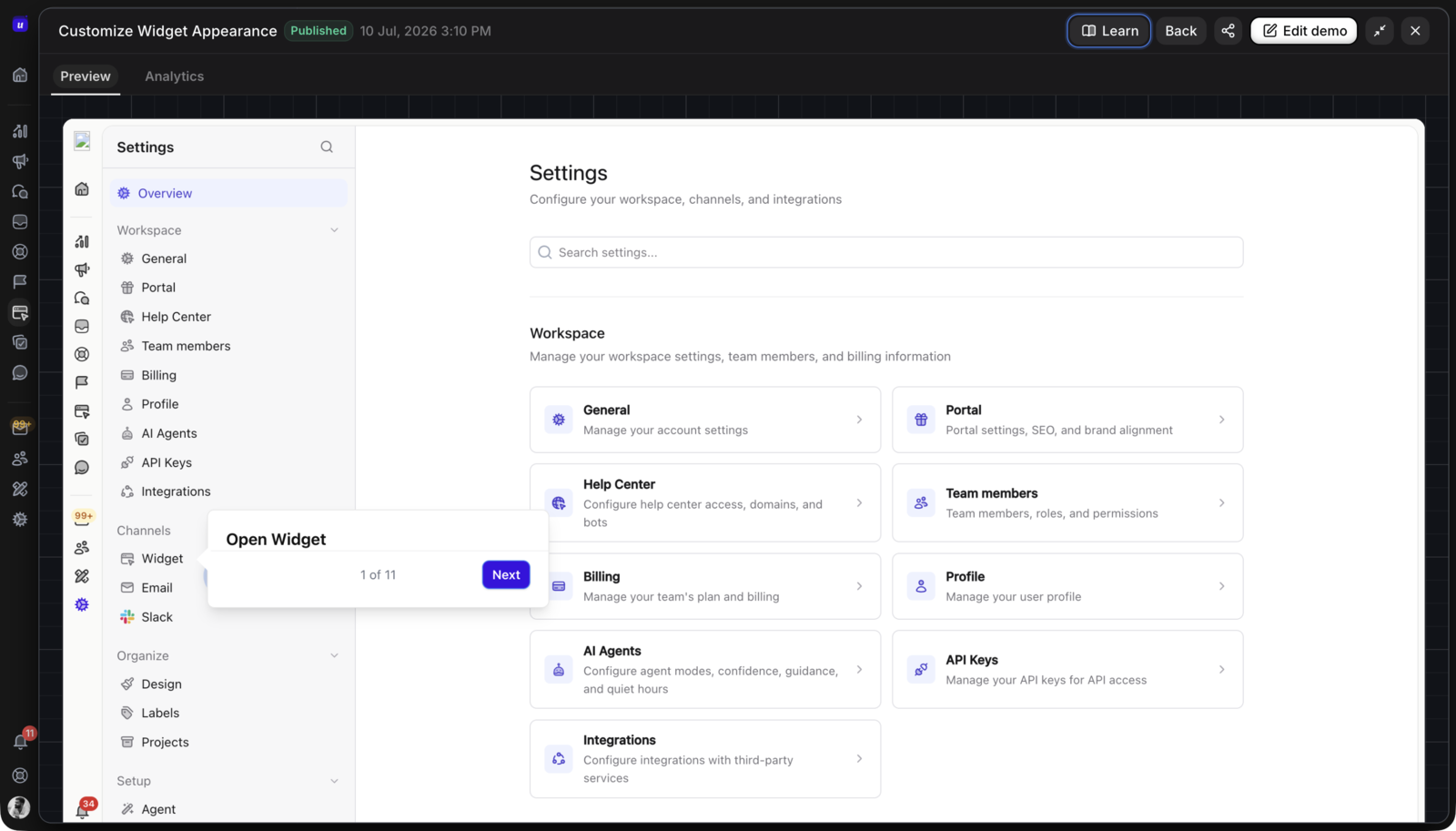
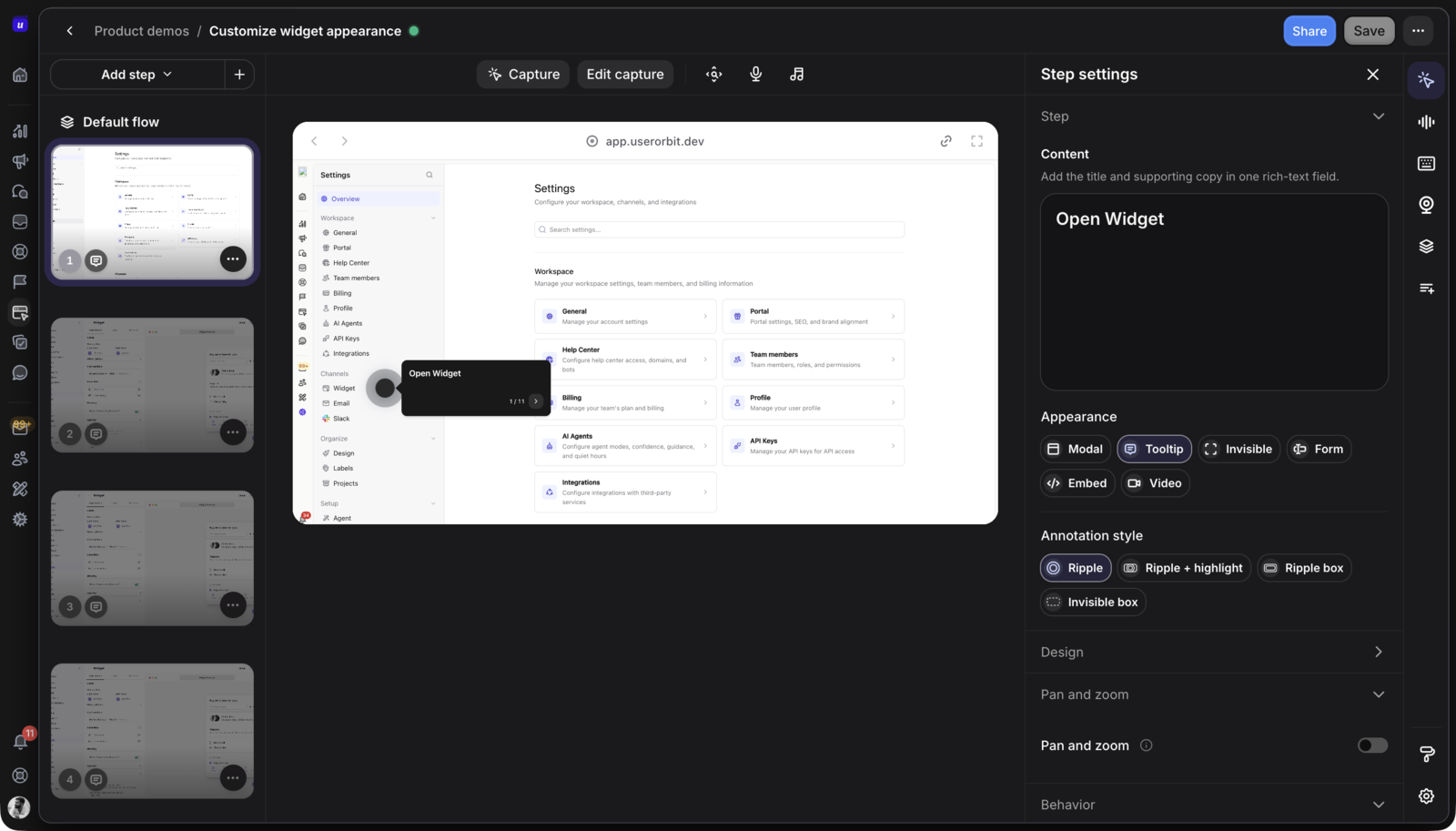
The Interactive Demos product page describes the current workflow: capture a product journey with the Chrome extension, turn the capture into editable demo screens, add hotspots, guided steps, forms, and videos, then publish it by share link or embed. Userorbit also supports demo collections and reporting for views, completion, drop-offs, CTA clicks, and downstream adoption.
Why it stands out
- one asset can serve marketing, onboarding, support, launches, and adoption work
- capture starts from a real workflow rather than a blank canvas
- editable screens can be paired with guided steps, forms, and video
- demos can be published by link or embedded into customer-facing pages
- collections help organize related demos into a library or role-specific path
- analytics can go beyond a view count to include completion, drop-off, CTA, and adoption signals
Pricing and plan fit
The current Userorbit pricing page lists Growth at $95 per month when billed annually ($119 monthly), Scale at $249 per month when billed annually ($293 monthly), and Enterprise at custom pricing. Interactive product demos are included on Scale and Enterprise. Scale also adds demo videos, the Support Suite, knowledge base capabilities, advanced AI, and longer log retention.
That packaging matters. If you only need a single buyer-facing demo, a focused free or low-cost tool may be easier to approve. If you need the demo to connect to product tours, checklists, announcements, feedback, help content, and adoption reporting, the Scale comparison is more useful than comparing the entry prices of standalone demo builders.
Best for
SaaS product, growth, and customer-success teams that want to reuse product education across the customer lifecycle and keep ownership close to the people who write the experience.
Not best for
Teams that only need pixel-level HTML cloning for a pre-sales motion, or teams that are not ready for the Scale plan. In those cases, Navattic, Storylane, or a lower-tier Supademo plan may be a narrower starting point.
Read the introduction to Userorbit Interactive Product Demos for the product story, then use the Help Center and a trial to test a real workflow in your application.
2. Navattic: Best for a dedicated GTM demo program
Navattic is a strong choice for product marketing and go-to-market teams that treat demos as a conversion and enablement channel. Its pricing page separates media from HTML demos and adds capabilities for integrations, account identification, sandbox demos, A/B testing, interest areas, pipeline impact, collaboration, and dedicated customer success as plans expand.
The Navattic pricing page lists a free Starter plan with one seat, one demo, capture editing, unlimited views, and basic analytics. The paid Startup, Base, and Growth tiers are billed annually and do not show public prices on the page. Startup is aimed at bootstrapped or seed-stage companies with 30 or fewer employees; Base is aimed at marketing teams sharing demos for lead generation and launches; Growth adds more seats and sales-oriented capabilities. For a plan-by-plan buying worksheet, see the Navattic pricing guide; for replacement evaluation, use the best Navattic alternatives.
Best for
Product marketing teams that want HTML demos, marketing integrations, account-level signals, experimentation, and a dedicated demo operating motion.
Not best for
Lean product or customer-success teams that want one platform for demos, in-app guidance, help content, feedback, and adoption. Navattic can be a good demo system without being the rest of that workflow.
3. Storylane: Best for guided demos that can grow into HTML
Storylane is useful when a team wants to start with screenshot and video-based guided demos, then move into editable HTML and more advanced personalization. The Storylane plans page currently lists a free plan with one seat, one published demo, unlimited demo views, lead capture, and basic analytics. Starter is $50 per month on monthly billing, or $40 per month billed annually, for one seat, with additional seats listed at $40 each, and includes unlimited published demos. Read the focused Storylane pricing guide for plan limits, AI credits, Hubs, and the separate RepX pricing surface.
The Growth plan is listed at $625 per month on monthly billing, or $500 per month billed annually, and includes five seats, HTML demo support, an HTML editor, personalization tokens, A/B testing, and more advanced AI and account-reveal capabilities. The progression is clear: lower tiers favor fast guided tours, while Growth is for teams that need to change HTML, text, and elements inside the captured experience.
Best for
Teams that want a low-friction starting point, then expect to need HTML editing, personalization, experimentation, and integrations as the demo program matures.
Not best for
Small teams that need several editors or HTML capture at the lowest possible price. Check the published seat and plan limits before assuming the free or Starter tier will support a multi-person program.
4. Supademo: Best for documentation and enablement
Supademo is a practical fit when interactive demos need to travel with documentation, training, and enablement. The Supademo pricing guide covers the free plan for one creator, five guided interactive demos, 50 4K video recordings, unlimited views, AI text personalization, and sharing by link, embed, video, or PDF.
Scale is listed at $38 per creator per month with annual billing. It adds branching, variables, tracking links, analytics, collections, and Supademo AI/MCP. Business is $199 per month for one creator and adds guided HTML demos, HTML text and image editing, and priority support. Growth is listed at $350 per month for five creators and adds sandbox demos, a route hub, AI voice cloning, demo versioning, and white-glove onboarding. Enterprise starts at ten creators and adds SSO/SAML, data residency, multiple workspaces, and dedicated support and training.
Best for
Product teams, customer success, and enablement owners that need to turn one workflow into a shareable demo, video, PDF, or collection without building a large demo-operations program.
Not best for
Teams that need the deepest enterprise sales-room workflows on a small budget. Also check whether creator-based pricing still works when many people need to author rather than view.
5. Arcade: Best for interactive demos plus video
Arcade is a good choice when the same product capture needs to become an interactive demo plus a narrated video or GIF export. The Arcade pricing guide covers its free plan with unlimited AI demos, one published demo, one user, and unlimited views. AI-generated video is now sold as a separate Arcade subscription with its own credits.
Growth is listed at $42.50 per seat per month with annual billing. It adds demo branching, CTAs and forms, MP4 and GIF exports, custom branding, custom landing pages, integrations, team workspaces, advanced insights, and up to 10 users. Enterprise adds included seats, role-based access, multiple teams, HTML capture, demo collections, offline access, version history, SSO, custom domains, and dedicated support.
Best for
Product marketing and growth teams that want to produce interactive demos and short-form video from the same capture, with AI narration and translation in the workflow.
Not best for
Teams that need HTML capture or deeper governance before they can move beyond a small experiment. Those capabilities are on Enterprise, so compare the full price of the needed plan rather than the attractive Growth entry point.
6. Walnut: Best for revenue-led personalization
Walnut is built for sales and revenue teams that need to tailor demos to accounts, opportunities, and buying committees. The Walnut pricing page lists Ignite at $575 per month billed annually with three editor seats, three presenter seats, unlimited demos, demo analytics, engagement tracking, marketing integrations, and CRM integrations.
Accelerate is listed at $1,550 per month billed annually and adds sandbox demos, prospect personalization, video overlays, advanced analytics, InsightsAI, Salesforce capabilities, SSO/SCIM, and a white-labeled brand experience. Scale is custom and adds capabilities such as digital sales rooms, advanced translations, and a Data API for demo-engagement reporting.
Best for
Revenue organizations that want personalized demo journeys, CRM-connected engagement, playlists, and support for sales and customer-facing teams.
Not best for
Early-stage product teams looking for a transparent, self-serve tool to publish a few demos on a marketing site. Walnut’s pricing, seat model, and services make more sense when demo engagement is part of a larger revenue process.
7. Reprise: Best for enterprise demo environments
Reprise is a better match for enterprise product marketing, presales, and solution engineering than for a small team looking for a simple click-through. Its product marketing solution focuses on no-code guided demos, bulk find-and-replace for product data, demo analytics, and user activity insights.
The Reprise demo overview describes three approaches: a guided demo that captures the product’s look and feel, a live-app demo with injected data, and an application clone for a fully interactive environment. That range is useful when one team needs website leave-behinds, another needs a live sales walkthrough, and a solutions engineer needs a controlled environment for a technical conversation.
Best for
Large GTM organizations that need governance, repeatable demo environments, realistic data, multiple demo modes, and shared ownership across marketing, sales, and customer success.
Not best for
Startups that need public pricing, a fast first demo, or a small self-serve workflow. Reprise uses a sales-led buying motion, and the platform’s breadth brings more setup and governance work.
8. Demostack: Best for complex enterprise simulation
Demostack is designed for organizations that need product simulation rather than a single guided marketing demo. Its official site describes product cloning, overlays, interactive sandboxes, mobile app demos, playbooks, analytics, integrations, and enterprise security and data controls. The Demostack pricing page uses a custom enterprise buying motion rather than publishing self-serve rates.
Best for
Enterprise demo operations with complex applications, many stakeholders, controlled environments, repeatable playbooks, and requirements that extend beyond a marketing page.
Not best for
Teams that need to publish a simple web demo this week, or teams that want to evaluate price and product fit without talking to sales. A full simulation platform can be the wrong amount of system for a narrow documentation or launch job.
Choose by team situation
| Your situation | Start with | Why |
|---|---|---|
| Founder or first product marketer testing the channel | Arcade, Supademo, or Navattic’s free plan | You can validate one workflow before building a larger program |
| PLG SaaS team connecting marketing to onboarding | Userorbit | The demo can continue into tours, checklists, help, announcements, and adoption work |
| Marketing team optimizing website and campaign conversion | Navattic or Storylane | Both have dedicated GTM features, integrations, and experimentation paths |
| Team that needs one capture as demo, video, and PDF | Supademo or Arcade | Both publish into several formats; check your limits and branding requirements |
| Sales-led company personalizing account experiences | Walnut or Reprise | They are built around revenue workflows, personalization, and sales enablement |
| Enterprise presales team needing a controlled product environment | Reprise or Demostack | Clone and sandbox capabilities matter more than a low entry price |
Interactive demo, product tour, or video?
These formats overlap, but they are not interchangeable.
An interactive demo is a controlled representation of your product. A prospect can click through a workflow without an account, an integration, or a live environment. It works well on a product page, in a sales follow-up, inside a help article, or beside a launch announcement.
A product tour runs in the live product. It can target a user by plan, role, lifecycle stage, or behavior and guide the person toward an action that is available in their own account. Use a tour or checklist when the viewer is already inside the application and the goal is activation.
A demo video is passive. It is useful when the story needs narration, when the viewer is on a social or email channel, or when a controlled visual explanation matters more than exploration. It cannot tell you whether a viewer understood the path in the same way an interactive experience can.
The most useful systems let you combine them. For example, an interactive demo can explain a workflow before signup, a product tour can guide the same workflow after signup, and a short video can announce the feature to an audience that is not ready to click through.
For the post-signup part of that system, compare the best user onboarding software for SaaS teams and the product-tour activation workflow.
Pick the right capture model
The capture model is the decision that most affects both quality and maintenance.
Use captured screens for speed
Captured screens with guided steps are a good default when the story is known, the team needs a demo quickly, and viewers do not need to change data or explore every route. This model is often the fastest way to create a sales leave-behind, help-center walkthrough, or launch asset.
Use HTML when editing fidelity matters
HTML capture is useful when you need to change text, buttons, values, or visual details after recording. It can create a more responsive and editable experience, but it may sit behind a higher plan. Confirm which vendor tier includes HTML editing rather than assuming “interactive” means HTML.
Use a sandbox or clone for realistic exploration
Sandbox and clone environments make sense when buyers need to explore different paths, when sample data must be personalized, or when a live product is too risky for a sales conversation. They also carry more setup, data, governance, and maintenance requirements.
Use the live app only when freshness wins
Live-app demos show the current product and can support richer interaction, but they inherit permission, data, uptime, and state problems. They are usually a better fit for trained sales or solutions teams than for a public page that must work for every visitor.
How to run a fair trial
Do not compare tools by watching each vendor’s polished demo. Give every finalist the same workflow and the same success criterion.
- Choose one valuable path. Pick a workflow a new buyer, user, or champion needs to understand, such as configuring an integration or creating a first project.
- Capture it three ways. Test the fastest guided capture, the editable experience, and any sandbox or live-app option you may actually purchase.
- Build the distribution set. Publish the same story on a landing page, as a share link, and in a help or onboarding context. Check mobile behavior and loading time.
- Measure the next action. Track starts, completion, step drop-off, CTA clicks, form submissions, and the downstream action that matters. A high view count alone is not a buying signal.
- Test maintenance. Change one screen, rename one feature, remove one step, and update one audience condition. See whether the owner can make the change without engineering.
- Price the real rollout. Compare the number of authors, published demos, viewers, domains, integrations, support level, and capture model you need at 3, 12, and 24 months.
The final test is ownership. A demo program needs a named person who can remove stale steps, review analytics, and decide when the experience should point to a live product tour or a support article.
Is Userorbit the right fit?
Choose Userorbit when the buying job is bigger than “put a clickable demo on our homepage.” It is a strong fit when product, growth, or customer-success teams need to:
- show a real workflow before signup
- reuse the same asset in onboarding, help, announcements, and changelogs
- connect demo engagement to product adoption work
- publish without asking engineering to rebuild every story
- keep tours, checklists, feedback, and customer communication in the same platform
Start with another tool when the requirement is narrower and more specific. Navattic or Storylane may be the better shortlist for a dedicated HTML-heavy GTM demo program. Supademo is a practical option for documentation and multi-format sharing. Arcade is compelling when AI video and interactive content need one capture. Walnut, Reprise, and Demostack are better aligned with enterprise revenue and simulation requirements.
The right answer depends on the workflow after the demo. If the viewer needs to start using your product, a demo should lead into onboarding. If the viewer needs help with an existing workflow, it should lead into support content. If the viewer is a qualified account, it should give sales or customer success useful engagement context. A demo platform earns its place when it supports that next step.
Interactive demo software FAQs
Short answers for SaaS teams comparing demo builders, HTML capture, video, and sandbox platforms.
Sources and update note
This comparison was reviewed on October 23, 2026 using the official Userorbit interactive demos, Userorbit pricing, Navattic pricing, Storylane plans, Arcade pricing, Supademo pricing, Walnut pricing, Reprise product marketing overview, Reprise demo overview, Demostack product demos, and Demostack pricing pages. For the focused plan tables and team-cost math, see the Arcade pricing guide and Supademo pricing guide. Verify current prices, plan limits, security requirements, and supported capture types before signing a contract.
Build a demo buyers can keep using
Capture a real workflow in Userorbit, publish it before signup, and reuse it for onboarding, support, and feature adoption.