Choose an audience
Define who should enter the workflow. Use conditions such as recent activity, segment membership or customer attributes to choose a relevant path.


Userorbit adoption workflows coordinate emails and in-app experiences around user behavior. Connect announcements, tours, checklists, surveys and help content in a sequence that responds to what each person does next.
Start for free, no credit card required
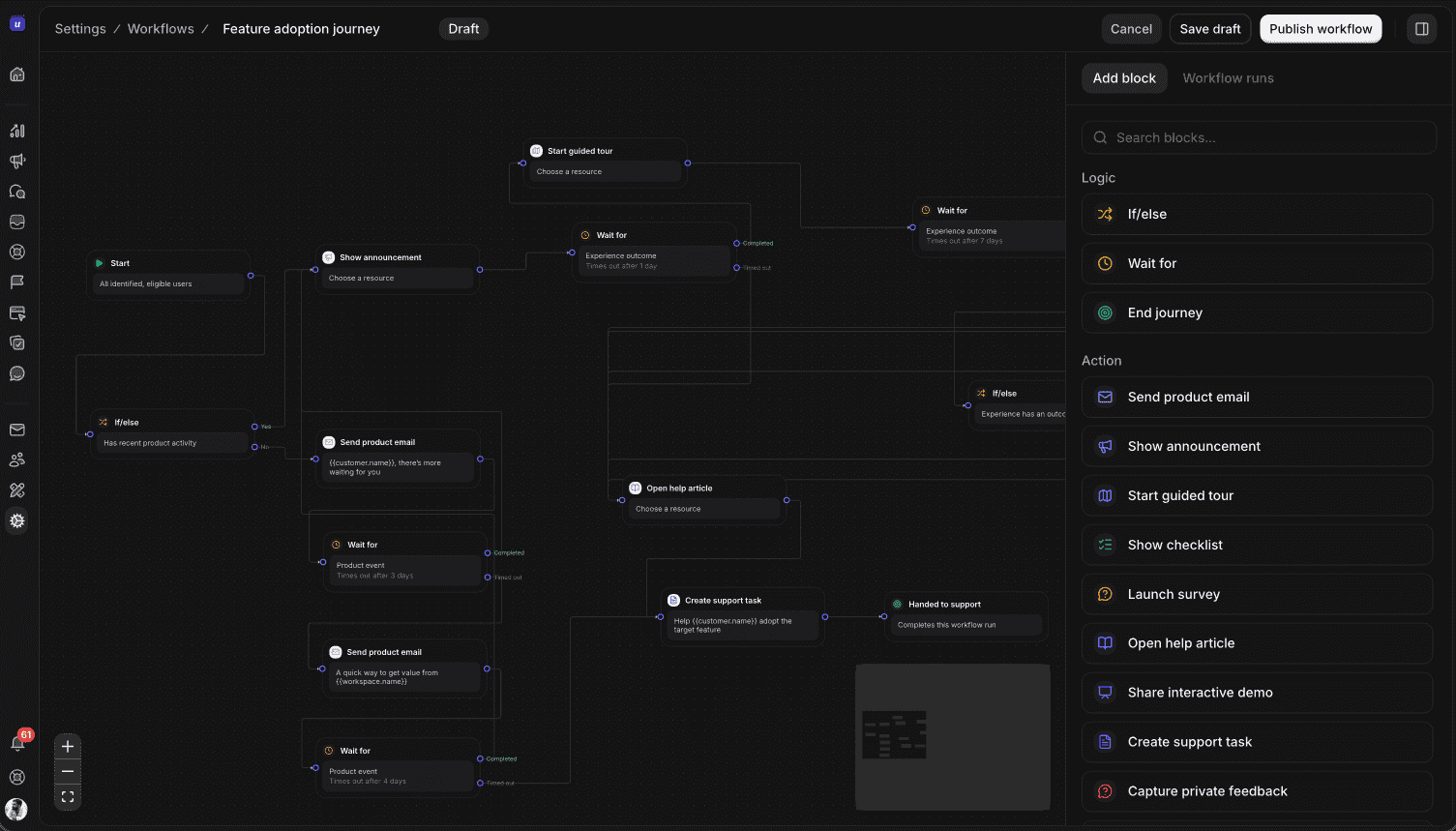
How it works
Choose an audience, connect the next steps, and review each run before refining the journey.
Define who should enter the workflow. Use conditions such as recent activity, segment membership or customer attributes to choose a relevant path.
Send an email or show an in-app experience. Wait for an event, a response or an experience outcome before moving on or branching.
Configure the linked experiences and sending setup, review the workflow, and enable enrollment and delivery for the workspace. Inspect runs to understand progress.
Use cases
Give new, active, and returning users a next step that fits what they have already done.
Announce what changed, guide people through the new capability, and check whether they reach the moment of value. If they do not, offer a checklist or a timely reminder.
Give new accounts a useful first path. Branch when a user completes setup, skips a step, or needs more time, so guidance stays relevant instead of repeating the same message.
Set a thoughtful re-engagement journey around meaningful inactivity. Give returning users a clear next step and stop the sequence when they are active again.
Set a goal for the workflow, review where people progress or leave, and use those patterns to improve the message, timing, or product experience.
Explore connected features
Use tours, checklists, surveys, and announcements together as the journey calls for them.
Guide people through a feature in context.
Explore Product toursBreak a complex setup into clear steps.
Explore ChecklistsCollect feedback at a useful point in the journey.
Explore SurveysExplain what changed and why it matters.
Explore AnnouncementsYes. Adoption workflows connect email, announcements, product tours, checklists, surveys and help articles using conditions, waits and actions.
Yes. A workflow can wait for an experience outcome and branch on completion or dismissal. For example, it can follow a completed tour with a checklist or offer help on another path.
Adoption workflows are available on Scale and Enterprise, with trial access. Configure the workflow's audience, linked experiences and email setup, then enable workspace enrollment and delivery. Workspace settings and plan limits control activation.
Adoption workflows guide customers through product experiences and email journeys. Support workflows route and manage customer conversations. Both are available in Userorbit, with different triggers and actions for each job.
Bring onboarding, feature education, and re-engagement into a journey you can review and improve.