Intercom alternativeResearch checked August 5, 2026

Userorbit vs Intercom: the practical B2B support comparison

Intercom is the deeper omnichannel service platform. Userorbit is the more connected option when support should feed feedback, roadmap, onboarding, help content, and product analytics. The right choice depends on which operating model you actually need.

Userorbit
Approved Userorbit support inbox mock showing queues and synthetic customer conversations
Product image from Userorbit Support Suite.
Intercom
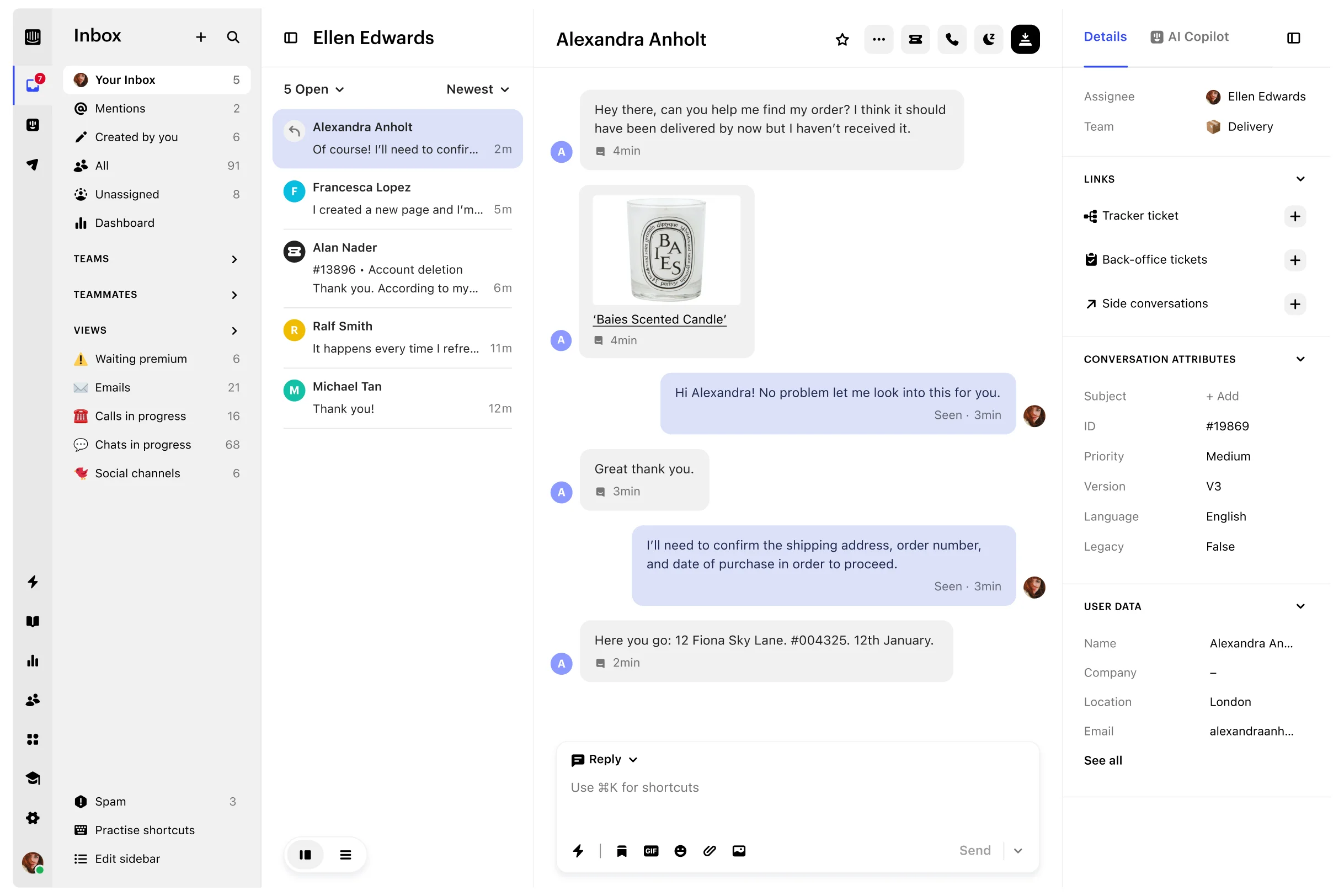
Official Intercom Inbox product view showing queues, conversation, composer, and customer details
Product image from Intercom Inbox.

Disclosure: Userorbit publishes this comparison and appears in it. We used current official product and pricing sources and did not run a hands-on Intercom account test.

See the method
The short answer

Neither product wins every support model

For most buyers, the decision becomes clear once you separate support-operation depth from the product work that follows a conversation.

Choose Userorbit when

Support should improve the product

  • Your main channels are in-app, email, help center, and Slack.
  • A lean B2B SaaS team owns support, feedback, onboarding, and launches together.
  • You want the conversation linked to feedback, roadmap, docs, and adoption reporting.
Choose Intercom when

Support is a larger service operation

  • Phone, WhatsApp, SMS, social, or broad consumer messaging channels matter.
  • You need multiple inboxes, multibrand operations, mature routing, or deeper service reporting.
  • Fin, Copilot, and the existing integration ecosystem justify the additional pricing units.
Stay with Intercom when

The migration would not solve a costly problem

  • Your current channels, workflows, reports, and contract are predictable.
  • Fin resolves enough conversations to justify its outcome cost.
  • Replacing historical context and integrations would cost more than the gap you are fixing.
The category difference

A helpdesk versus a customer-product loop

Intercom's center of gravity is service resolution at scale. Userorbit's is the connected journey from customer signal to product decision, communication, and adoption. The inbox overlaps; the systems around it are where the products diverge.
Feature parity

Compare the work, not the checkmarks

A feature can exist in both products and still differ materially in channel coverage, maturity, packaging, or the workflow it connects to.

Support operations

Swipe horizontally to compare both products →

CapabilityUserorbitIntercomPractical read
Shared inboxOne queue for in-app, help center, email, Slack, API, and admin-created conversations.Configurable shared Inbox with multiple team inboxes, conversations, and tickets.Comparable core; Intercom has greater operational depth.
Customer channelsIn-app support, help center, connected email, and connected Slack channels.Messenger, email, in-app chat, phone, WhatsApp, SMS, social channels, and more.Intercom is the stronger omnichannel choice.
Slack supportMessages and mentions become support threads; replies return to the originating Slack conversation.Public Slack channels can create Inbox conversations, with documented limits around customer-initiated DMs and direct ticket creation.Both support Slack, but evaluate the exact channel workflow.
Queues, assignment, and triageSaved views, assignees, statuses, priority, labels, tiers, tasks, and internal discussions.Multiple inboxes, advanced ticketing, round robin, workload management, and mature routing controls.Userorbit covers the B2B core; Intercom leads for larger operations.
Workflow automationNo-code triggers can route, assign, update fields, wait, message, add notes, notify Slack, or call a webhook.Visual Workflows automate assignment, SLAs, bots, data connectors, and broader helpdesk operations.Strong core parity; Intercom has a more mature automation surface.
SLAsFirst-response, next-response, and resolution targets by support tier and priority.SLA rules, workload management, and reporting; SLAs are listed with the Expert plan.Comparable core with different packaging.
Customer-facing AIAsk AI answers from published help content and hands unresolved cases to a teammate with context.Fin resolves across channels, can run procedures and actions, and is measured per successful outcome.Intercom has the deeper autonomous service product.
Agent assistanceSummaries, reply drafts, intent, sentiment, urgency, status, priority, and label suggestions for review.Copilot, conversation history answers, translation, summaries, quality tooling, and operational analysis.Comparable assistive core; Intercom has more depth around support operations.
Help centerKnowledge base connected to the inbox, Ask AI, product communication, and custom branding workflows.Public, private, multilingual, and multibrand help-center options depending on plan.Intercom leads in multilingual and multibrand maturity.

Product engagement and platform

Swipe horizontally to compare both products →

CapabilityUserorbitIntercomPractical read
Product tours and checklistsNative tours and checklists with targeting, completion analytics, localization, video, and voiceover.Tours, checklists, posts, and other proactive formats through Proactive Support Plus.Both cover onboarding; Userorbit makes it part of the broader product suite.
SurveysNPS, CSAT, CES, and custom surveys with targeting and multiple distribution options.Targeted surveys with branching and shareable distribution through its proactive messaging products.Broad parity, with different packaging and reporting context.
Announcements and changelogDedicated announcements and a structured changelog connected to releases and adoption workflows.Posts, News, banners, chats, and outbound messages for proactive communication.Userorbit is more release-communication focused; Intercom is broader outbound messaging.
Feedback and public roadmapFirst-class feedback boards, voting, roadmap, and support-to-feedback linking.Surveys, tags, conversation topics, and analysis, but no equivalent public roadmap is advertised as a native product.Userorbit has the clearer product-feedback advantage.
Product analyticsFeature adoption, journeys, cohorts, retention, and product-behavior reporting.Helpdesk, conversation, AI, and outbound performance reporting.Userorbit leads for product analytics; Intercom leads for support-operations analytics.
Interactive demos and demo videosNative interactive demo creation and AI-assisted demo videos for launches, onboarding, and support.No directly equivalent native creation product is advertised.A Userorbit-only product workflow in this comparison.
API, integrations, and AI toolsPublic API, webhooks, and MCP tools that can read and act across support and product resources.Flexible APIs, data connectors, MCP access, and hundreds of marketplace integrations.Intercom has the ecosystem advantage; Userorbit connects more product-loop objects in one workspace.
Enterprise controlsRBAC, audit logs, custom retention, custom limits, SLA options, and self-hosting options on Enterprise.SSO and identity management, HIPAA support, multibrand controls, permissions, and mature governance.Intercom leads overall; Userorbit's self-hosting option is distinctive.

“No equivalent” means we did not find a directly comparable native product in the official materials reviewed. It does not rule out an integration, custom workflow, or newly released capability.

The consequential differences

Where each product spends its depth

The most important differences are not isolated features. They are the workflows each platform has chosen to make first-class.

Intercom's advantage

AI and service operations at larger scale

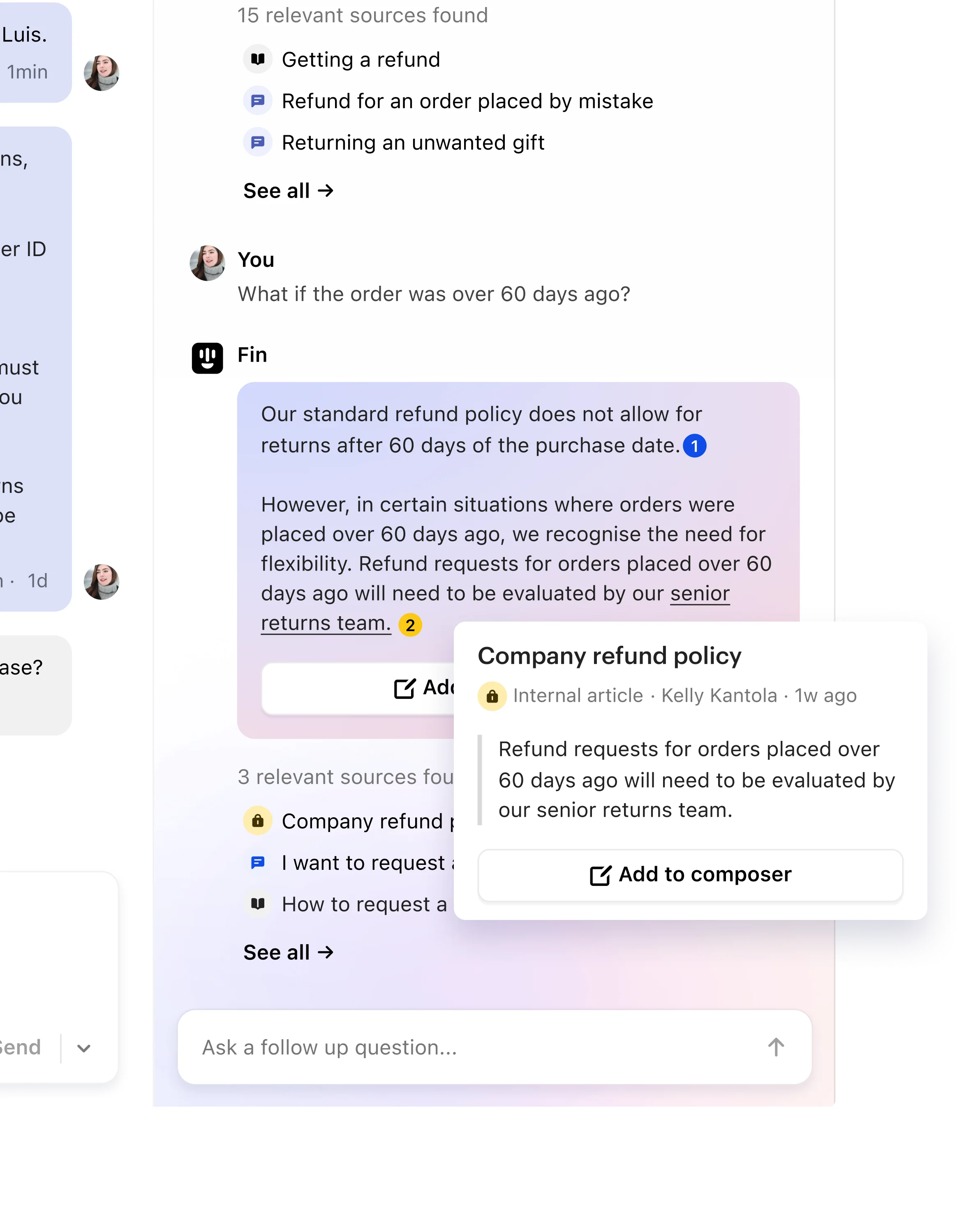
Intercom combines Fin, Copilot, multilingual assistance, advanced ticketing, workload controls, multiple inboxes, omnichannel service, and mature reporting. That depth matters when support is a specialized organization rather than one responsibility of a product team.

Official Intercom Copilot product image showing cited answers from support content
Source: Official Intercom Inbox product image.
Userorbit's advantage

The support conversation stays attached to product work

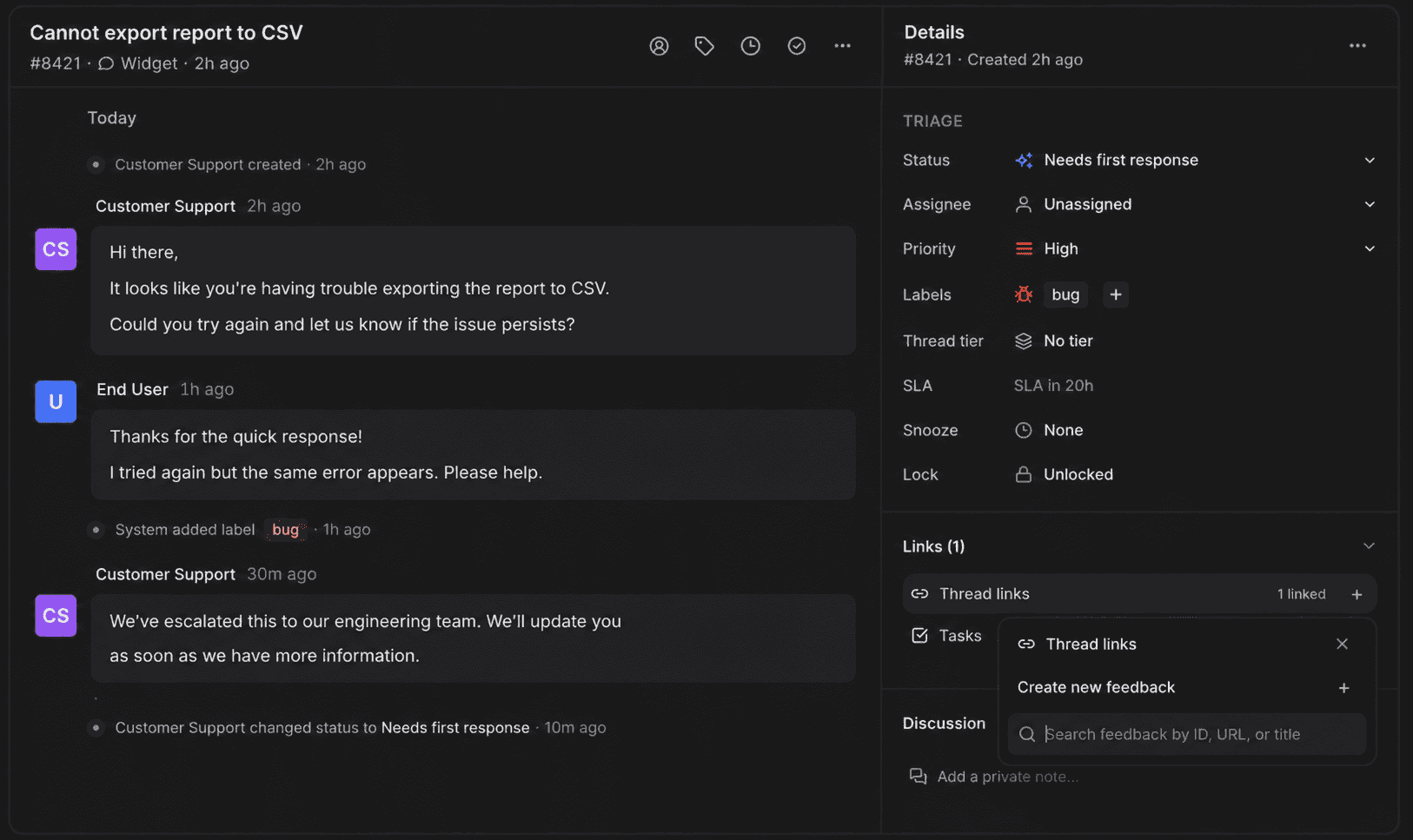
A Userorbit thread can become feedback, roadmap input, help content, or a product communication task without leaving the workspace. That shortens the distance between hearing a recurring problem and changing what users experience next.

Userorbit support thread linked directly to a product feedback item
Source: Userorbit Support Suite.
Userorbit's center of gravity

Conversation to product change

Support thread
Feedback or help gap
Roadmap and release work
Announcement or onboarding
Adoption signal
Intercom's center of gravity

Conversation to service resolution

Customer channel
Routing and ticketing
Fin or teammate
Resolution and SLA
Service reporting or outbound
Pricing mechanics

Compare what makes the bill move

The listed entry prices are not equivalent bundles. Model the workspace, seats, AI outcomes, channel usage, add-ons, and adjacent tools you will actually use.

Userorbit Scale
$249/monthbilled annually; $293 month to month
Workspace plan + MAU allowance
  • Support Suite inbox and knowledge base
  • Advanced AI and 10,000 MAUs listed on Scale
  • Tours, checklists, surveys, announcements, feedback, roadmap, analytics, and demos in the wider suite
  • Custom limits, retention, SLA, and self-hosting options move to Enterprise
See Userorbit pricing
Intercom
From $29/full seatstandard Essential annual price; offers can vary
Seats + outcomes + add-ons + channel usage
  • Advanced and Expert increase the per-seat price for deeper operations and governance
  • Fin is listed at $0.99 per successful outcome
  • Copilot and Pro are separate optional products
  • Phone, WhatsApp, SMS, and campaign usage can add variable charges
See Intercom pricing

Do not compare $249 with $29

One is a workspace suite price and the other is one full seat before outcome, add-on, and usage charges. The fair calculation uses your team size, expected Fin outcomes, required channels, and the separate feedback, roadmap, onboarding, survey, changelog, demo, and analytics tools you would otherwise keep.

Migration reality

Switch only when the operating gain clears the migration cost

Intercom conversations, contacts, companies, help content, custom data, reports, bots, and workflows do not all move through one browser export. Preserve the source data first, then rebuild only the workflow you still need.

Read Intercom's conversation export documentation
  1. 1

    Audit

    List every channel, inbox, role, SLA, field, tag, bot, workflow, report, integration, and help-center URL in use.

  2. 2

    Export

    Save contacts, companies, reporting data, help content, and full conversation content through the appropriate API or cloud-storage method.

  3. 3

    Map

    Decide what becomes a Userorbit thread, label, tier, view, workflow, feedback item, roadmap link, or read-only archive.

  4. 4

    Rebuild

    Recreate tool-specific routing, automations, permissions, channel connections, and reports; do not assume they translate automatically.

  5. 5

    Pilot

    Run a small queue in parallel and test inbound delivery, replies, assignments, SLA timing, Slack behavior, AI handoff, and exports.

  6. 6

    Cut over

    Freeze changes, route new conversations, retain a read-only Intercom archive, and monitor missed requests, response time, reopen rate, and manual work.

Importer note: Userorbit does not currently advertise a public one-click Intercom importer. Confirm assistance, historical-object coverage, attachments, internal notes, timestamps, and rollback options before purchase.
Method and sources

How this comparison was built

We compared the current public product definitions, pricing units, channel documentation, and migration material. We did not score either product with an invented percentage.

Editorial perspective: Userorbit publishes this page. There are no paid placements or affiliate links. Intercom imagery comes from Intercom's official public materials; the Userorbit inbox is an approved product mock with synthetic customer data. Product and price details were checked August 5, 2026 and should be reconfirmed before purchase.

Userorbit and Intercom FAQ

A good fit for connected B2B support

If the ticket should become product work, see the whole loop in Userorbit

Bring in-app, email, help-center, and Slack conversations into one inbox, then connect what customers report to feedback, roadmap, docs, onboarding, announcements, and analytics.