

Customer support software for SaaS teams
Bring in-app, help-center, email, and Slack requests into one shared inbox with AI-assisted replies, no-code workflows, customer context, and SLA-aware triage.
Start for free, no credit card required
One shared inbox for SaaS support
One place for customer conversations, AI-assisted resolution, workflows, SLA-aware triage, internal collaboration, and the feedback and help content you already run in Userorbit.
One inbox for every channel
In-app messages, support emails, and Slack threads land in the same queue. Todo, Mine, Unassigned, Snoozed, and Done views keep the day organized.

Reply where the customer asked
Answer from the thread and the response goes back through the originating channel. The customer stays in their email or Slack, your team stays in one inbox.

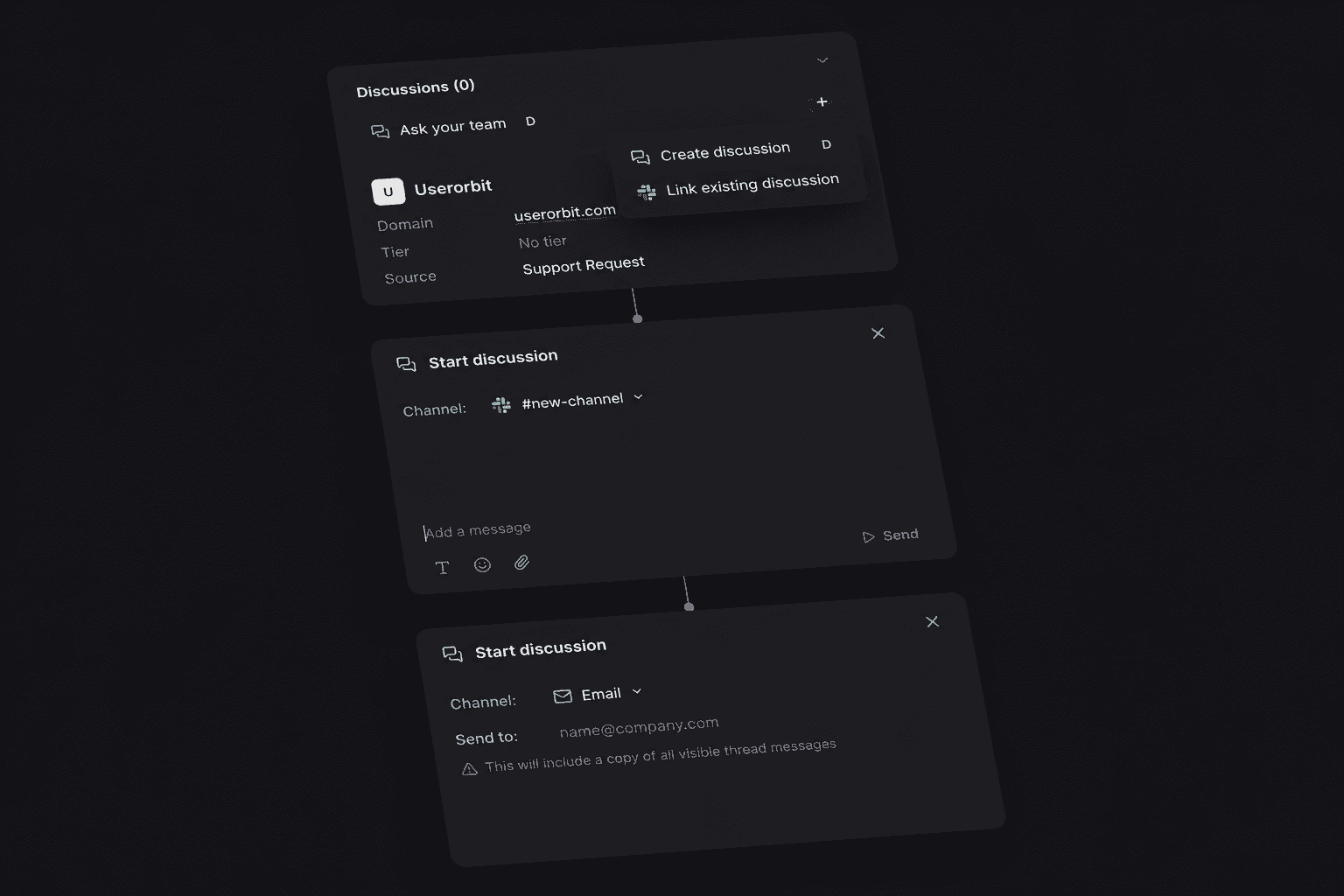
Discuss privately, answer publicly
Start an internal discussion on any thread to pull in teammates without exposing the conversation. When the answer is ready, reply to the customer from the same view.
Support that feeds the roadmap
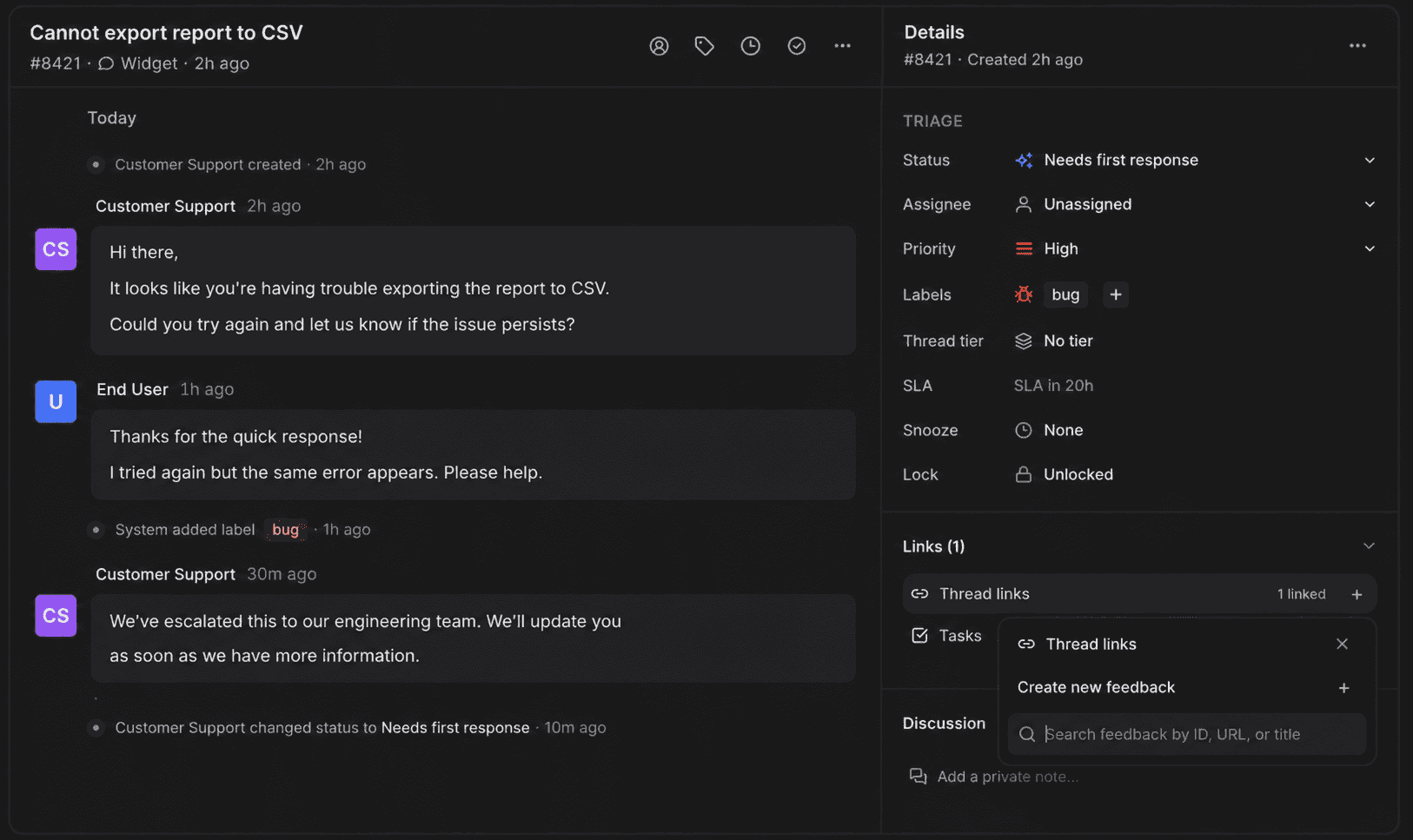
Turn support conversations into feedback items, roadmap input, and help articles. The questions customers ask become the things you fix and document.
A shared inbox for the way SaaS teams support customers.
Support lives next to your feedback boards, roadmap, announcements, and help center. AI and workflows help the team resolve each request, while the original conversation improves the product and the docs.
Start with the inbox
Shared inbox for SaaS support
Bring in-app, help-center, support email, and Slack requests into one queue. Each thread keeps its source channel and the customer's context attached.
Slack support with a clear reply path
Messages and mentions become support threads, while channel-aware replies return to Slack. Teammates can discuss the case privately before sending the answer.
Automated triage and SLA tracking
No-code workflows can route, assign, label, prioritize, and follow up. Tiers show first-response, next-response, and resolution targets so the queue stays accountable.
Support that feeds product decisions
Turn recurring support conversations into feedback, roadmap input, and help content so the next customer can find the answer before opening another thread.
Customer support features for SaaS teams
The Support Suite combines a shared inbox, Slack and email support, AI-assisted resolution, no-code triage, customer context, SLA tracking, and a direct feedback loop.
Shared inbox
Todo, Mine, Unassigned, Snoozed, Done, and All views over every SaaS support conversation, whatever channel it came from.
In-app and help-center requests
Let customers start and revisit support requests from your embedded experience or public help center.
Email channels
Connect your support address and handle inbound email as threads, with replies sent from the same address.
Slack customer support
Messages and mentions in connected channels become support threads. Replies post back to the Slack conversation.
Channel-aware replies
Reply from the thread and the customer gets it where they asked: in-app, email, or Slack.
AI-assisted resolution
Summarize cases, draft replies, classify intent and urgency, and review suggested status, priority, and labels.
No-code support workflows
Route, assign, label, prioritize, wait, follow up, notify Slack, or call a webhook when a conversation changes.
Customer and company context
See previous requests, company details, product events, feedback, related cases, and linked work beside the conversation.
Tiers and SLA tracking
Set first-response, next-response, and resolution targets and see due time and breach state on each case.
Internal discussions
Side conversations with teammates on any thread, invisible to the customer.
Labels, tiers, and tasks
Organize the queue by topic and priority, and track the follow-up work a conversation creates.
Saved views
Slice the queue by status, assignee, source channel, label, or tier, and save the views your team works from.
Feedback capture
Turn a support conversation or a Slack message into a feedback item on your boards without retyping it.
Slack notifications and digests
Queue activity, assignments, and digests delivered to your team's Slack, tuned per channel.
API and MCP access
Let integrations and AI agents manage threads, replies, notes, labels, assignments, discussions, and workflows.
What is customer support software for SaaS?
Customer support software for SaaS gives product teams one place to receive, assign, answer, and learn from customer requests. Userorbit Support Suite brings in-app, help-center, email, and Slack conversations into one shared inbox with channel-aware replies, AI assistance, no-code workflows, customer context, saved views, tiers, and SLA tracking.
Which support channels are supported?
Customers can contact you through the embedded in-app support experience, your public help center, a connected support email address, or connected Slack channels. The team handles every request from the same inbox, and replies return through the originating channel.
How does Slack customer support work?
Connect the Slack channels where customers ask questions. Messages and mentions become support threads in your inbox, and your replies post back to the Slack conversation. You can also capture feedback from Slack straight into your feedback boards, and get Slack notifications and digests for queue activity.
Does Support Suite include AI assistance?
Yes. Ask AI can answer from published help content and hand unresolved conversations to a person with the recent context attached. For agents, AI can summarize a case, draft a reply, classify intent, sentiment, and urgency, and suggest status, priority, and labels for review.
Can I automate support workflows?
Yes. Build no-code workflows that react to new threads, replies, status changes, assignments, priorities, or labels. Workflows can route and assign conversations, update fields, wait for a response, send a message, add a private note, notify Slack, or call an HTTPS webhook.
Can I track support tiers and SLAs?
Yes. Define first-response, next-response, and resolution targets for support tiers, including priority-specific rules. Each case shows its relevant due time, time remaining, and breached state so agents can prioritize the queue.
Can my team discuss a ticket privately?
Yes. Every thread supports internal discussions that the customer never sees. Use them to pull in teammates, debate a fix, or hand off context, then reply to the customer from the same view.
How is this different from a regular helpdesk?
Support threads live next to your feedback boards, roadmap, announcements, and help center. A support conversation can become a feedback item, a roadmap vote, or a help article, so what customers report actually reaches what you build next.
Can our integrations or AI agents work with the support inbox?
Yes. The public API and Userorbit MCP tools can list, create, inspect, update, reply to, label, assign, merge, and discuss support threads. Workflows can also connect external systems through HTTPS webhooks.
Which plans include the Support Suite?
The Support Suite is included on Scale and Enterprise plans.
Answer faster. Learn more from every ticket.
Run support, feedback, roadmap, announcements, and help content from the same Userorbit workspace.