










Product tours remain one of the highest-leverage activation tools a PM can ship. When activation dips, the instinct is predictable: spin up a tour, get it out the door, wait for the metric to move.
Then a few releases ship. The UI shifts. The tour is now misaligned or outright broken.
This post covers two things: a repeatable way to create a product tour quickly, without rebuilding from scratch, and a maintenance model that prevents tour breakage when product updates ship.
It also addresses the operational issues teams hit repeatedly: cross-team ownership, permissions and states, async rendering, and over-touring users instead of guiding them.
If the experience needs to explain your product before a visitor has an account, use an interactive product demo software comparison to choose the capture and publishing model first. Bring the user into a live tour only when they can take the action in their own workspace.
What product tours are really for
A 2024 study by Product-Institute analyzing 500 B2B SaaS companies found that users who skip or abandon product tours show 34% higher churn rates within 90 days compared to those who complete contextual, goal-oriented onboarding flows.
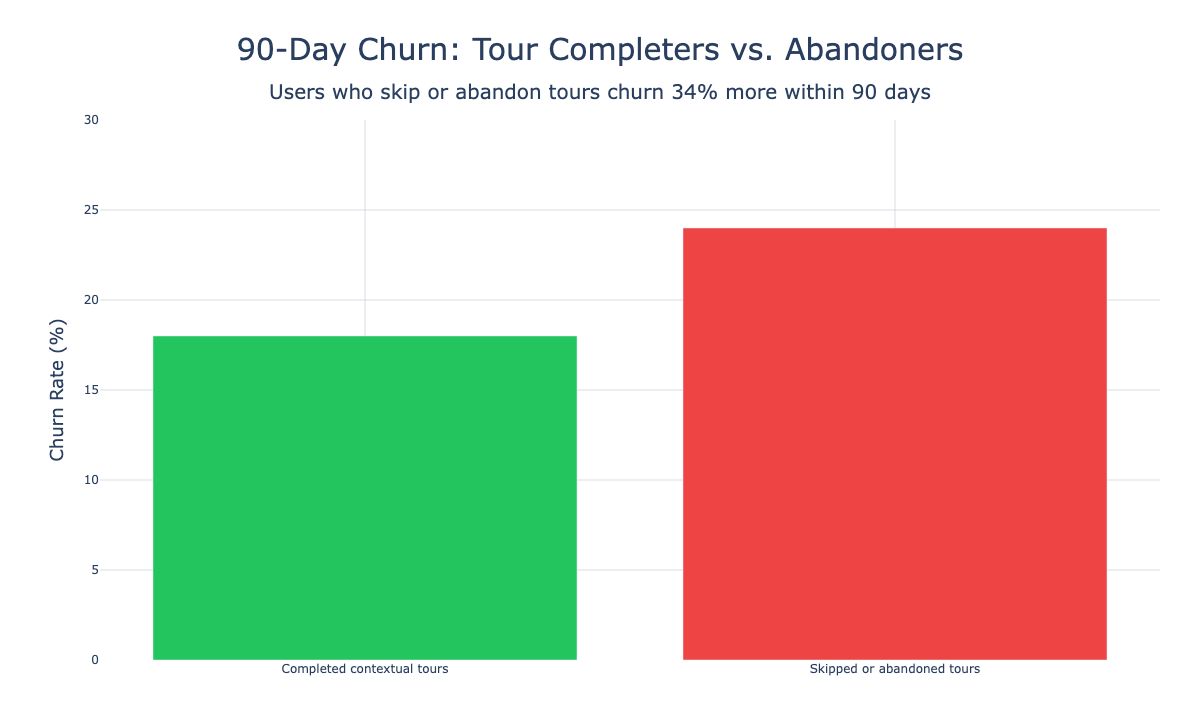
Tours that try to show everything the product can do will bloat and become expensive to maintain. Users don't need a guided walk through navigation. They need the shortest path to a meaningful outcome.
A good tour is aligned to one of these jobs:
- First value tour: helps a new user reach the "aha" moment quickly
- Setup tour: guides a user through prerequisite configuration before they start something more complex
- Feature adoption nudge: provides guidance at the moment of need, later in the lifecycle
Each has a defined trigger and a measurable outcome. If your tour doesn't fit one of these, it's doing too much.
The front-end tax nobody budgets for
Tours break after product updates because they're bound to a surface area that changes constantly. The usual suspects:
- DOM structure changes
- New layouts and responsive breakpoints
- Permission gates (RBAC)
- Feature flags toggling UI on and off
- Empty states vs. populated states
- Async loading in SPAs
PM-owned tours become exhausting to maintain. The failures are predictable:
- Tooltip misplacement on initial render, common when layout settles after async content loads
- Tours not firing, caused by initialization order, routing changes, or framework adjustments
- Overlay and highlight issues that surface after upgrading a tour library or shipping a new component
All of these happen routinely in any tour system that relies on brittle DOM targeting without a maintenance workflow behind it.
A repeatable way to launch and maintain tours
The tours that ship fastest tend to be the most deliberate, not the most complex. What follows is a repeatable workflow that lets you create a tour in hours, not weeks, while keeping it intact the next time your team ships.
Write a tour brief before anything else
A tour brief prevents you from building something technically impressive but strategically meaningless. It forces alignment before anyone writes code or configures a step.
Tour Brief template:
| Field | Example |
|---|---|
| Tour name | "First project created" |
| Audience | Role, plan, persona |
| Trigger | First login, after signup, when user visits X page, after event Y |
| Steps | UI patterns, step-by-step |
| Prerequisites | Permissions, data exists, integration connected |
| Target outcome | User completes X action |
| Time budget | 30–90 seconds |
| Success metric | Activation event completion, time-to-first-value, conversion rate |
| Recovery rule | What happens if a step cannot find its UI anchor |
| Analytics | Events to capture |
Share the brief with Engineering, Design, and CX before building anything.
Pick the right UI patterns
PMs default to modal walkthroughs, but the least intrusive UI that still gets the job done is almost always the better choice.
- Announcement: small banner or slideout for context, not a blocking modal
- Direction: tooltip anchored to the exact UI element
- Discovery: hotspot, optional and unobtrusive
- Progress: checklist, especially when setup requires multiple steps
A checklist works best when it contains 3–5 items. More than that, and completion drops sharply.
Microcopy matters here. Short, action-oriented labels outperform descriptive ones. "Create your first project" beats "This is where you can manage all your projects."
Test like a release
Every user comes with their own imperfect environment. Testing the tour means testing across variations of roles and permissions, subscription plans, browsers, and device sizes.
One thing gets missed in the chaos of a release: every UI change touching a tour flow needs a "tour check" from the Product Manager.
If tours are part of the product, they need product hygiene:
- A tour smoke test in staging
- A checklist item in release notes
- A clear owner (PM, Growth, or CX ops)
- Defined SLAs for fixing broken steps
Roll out like an experiment
The goal is to avoid shipping a tour that hurts activation. Start with internal or friendly users. Expand to a percentage of new signups, then widen from there.
This staged rollout gives you signal before committing. If the tour creates confusion or increases drop-off in the first cohort, you catch it before it touches your full user base.
Measure what matters
Track how users behave with the tour, and keep an eye on tour health.
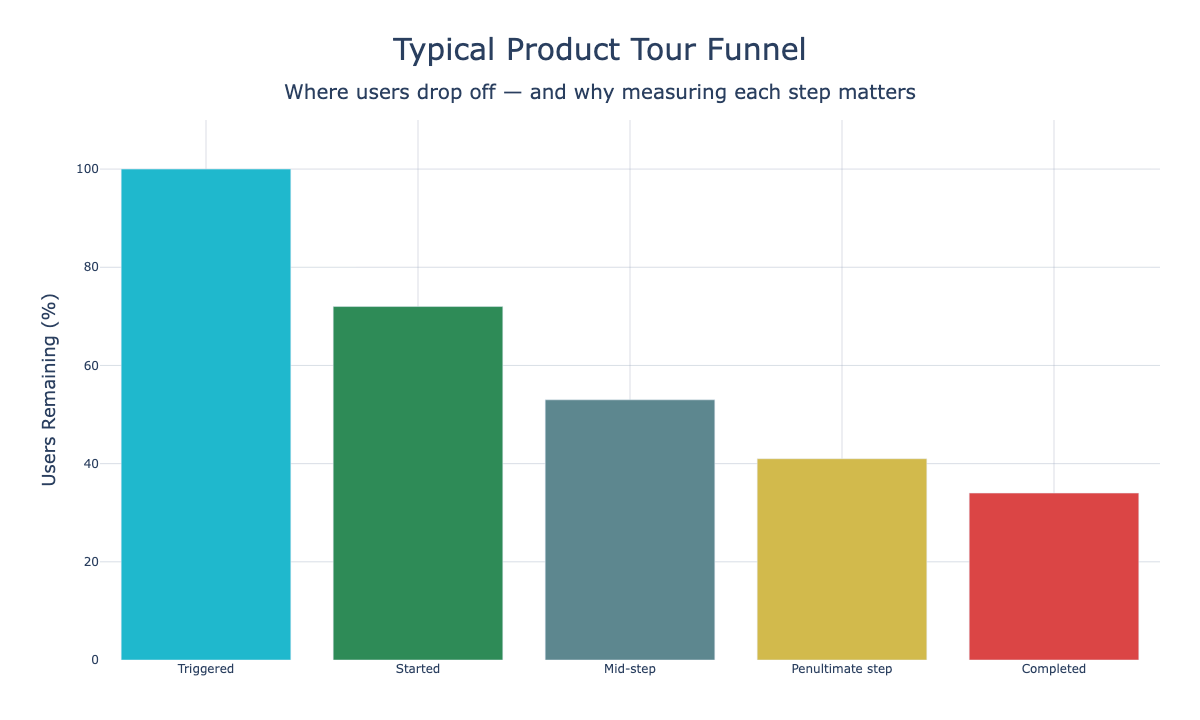
The metrics that matter:
- Trigger-to-start rate: are users seeing the tour?
- Completion rate: are they finishing it?
- Step drop-off points: where do they bail?
- Time to complete: is the tour too long?
- Impact on activation metric: your real KPI
- Failure events: anchor missing, permission blocked, step skipped due to error
If completion rate is high but the activation metric doesn't move, the tour is teaching the wrong thing. Go back to the brief.
Evaluating tour builders
If you're considering a platform, or replacing an existing one, the question to focus on is: "How much work will this create after my product changes?"
Look for capabilities that reduce brittleness:
- Stable anchoring methods, not just click-to-select DOM selectors
- Branching and prerequisites based on user state
- Versioning and rollback so you can revert without redeploying
- Tour health monitoring with broken step detection before users hit it
- Role and permission-aware targeting that respects RBAC
- Low engineering dependency for edits so PMs can update copy and reorder steps without a deploy
The bottom line
For PMs and Growth PMs, success looks like this: tours stop breaking and engineering bandwidth goes back to shipping features.
Write a brief before building. Pick the least intrusive UI that works. Test across real user environments. Roll out incrementally. Measure both tour health and activation impact.
Product tours are not a "set it and forget it" feature, but with the right workflow they don't have to be a maintenance burden either.
Ship tours that don't break
Userorbit gives you stable anchoring, tour health monitoring, and no-code management — so your tours keep working as your product evolves.