










Your activation rate is stuck at 25%. Users sign up, poke around, then vanish. The obvious fix? Product tours. Walk them through the value. Show them where the magic happens.
Now comes the question every product team eventually asks: Do we build this ourselves or buy a platform?
I've seen teams go both directions. Some built their own tour system and regretted it within six months. Others built in-house and it worked out fine. The difference usually comes down to a few specific factors that are easy to evaluate upfront.
This guide covers the real costs of each path, the hidden gotchas, and a framework for figuring out which one fits your situation.
The Real Cost of Building In-House
Let's start with what you're signing up for when you build your own tour system.
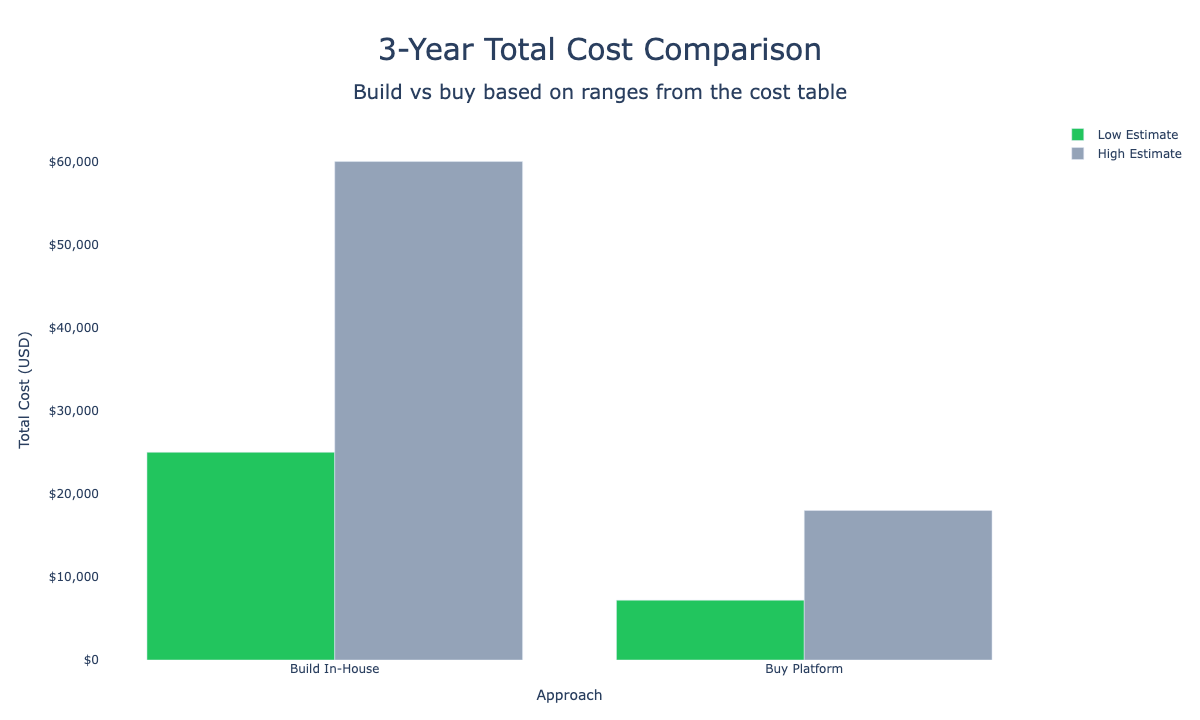
The bar chart below shows the total 3-year cost range side by side.
Upfront Development
A basic no-code tour builder requires 80-140 developer hours minimum. That covers:
- Element targeting and highlighting
- Step sequencing and navigation
- Basic styling and positioning
- Storage for tour definitions
- Triggering logic (show on first login, on feature access, etc.)
At $50/hour (offshore rates), you're looking at $4,000-$7,000. At $100/hour (US mid-level), it's $8,000-$14,000. Add testing, QA, analytics integration, and deployment overhead, and you're closer to $15,000-$30,000 before your first tour goes live.
That's the sticker price. The real cost shows up later.
The Maintenance Tax
Every time you ship a feature, your tours need updating. Buttons move. Flows change. That checkout tour you built last quarter? Half the steps now point to elements that don't exist.
Forbes Tech Council found that outdated tours create more confusion than guidance. Users click "Next" and nothing highlights. They follow instructions for a flow that was redesigned. Instead of reducing friction, stale tours add it.
Maintenance costs for a typical SaaS product run $2,000-$10,000/year. Companies with fast release cycles (bi-weekly or faster) report spending $30,000-$50,000 annually just keeping tours current.
That maintenance work falls on engineers who'd rather be shipping features. Or it falls on product managers who don't have the technical access to fix broken selectors. Either way, someone's getting pulled off higher-value work.
Context Switching Overhead
Product tours are nobody's primary responsibility. When something breaks, it becomes an interrupt.
An engineer gets pulled off sprint work to fix a broken tour. A designer has to update screenshots. A content writer rewrites copy because the UI changed. None of these are heroic efforts. They're low-value interruptions that fragment focus across the team.
Research on engineering productivity consistently shows context switching as one of the biggest velocity killers. Every switch costs cognitive energy and extends task completion time. Tour maintenance creates systematic context switching—quarter after quarter, interrupt after interrupt.
Technical Debt Accumulation
Tours become technical debt faster than you'd expect.
Six months in: the tour system works, but mobile support never got built. The analytics integration talks to your old event schema. Language support covers English and Spanish but not German (your fastest-growing market).
A year in: changing the tour system feels risky. Nobody wants to touch it because the original engineer left and documentation is sparse.
Two years in: you're maintaining a creaky system that sort-of works but can't be extended without significant investment.
ProductDock research shows that remediating embedded technical debt costs 3x what preventive solutions would have cost upfront. Tour systems follow this pattern reliably.
When Building In-House Makes Sense
With all those downsides, why would anyone build their own? Because sometimes it's the right call. Here are the scenarios where in-house development wins:
1. You Already Have Platform Infrastructure
If your team already maintains an internal design system, component library, or customer success platform, adding tour functionality might be incremental rather than ground-up work.
A company I worked with had built a sophisticated internal admin tool with its own UI framework. Adding product tours meant extending existing components, not building from scratch. Their marginal cost was maybe 40 hours of engineering time, not 140.
The test: Do you have reusable infrastructure that tours can plug into? If adding tours means extending something that already exists (and is already maintained), the math changes significantly.
2. Your Tour Needs Are Extremely Specialized
Standard tour platforms handle common patterns well: tooltips, modals, step sequences, checklists. If your product has unusual interaction models, third-party tools might not fit.
Examples where custom builds make sense:
- Highly interactive editors (design tools, video editors) where tours need to respond to canvas state
- Real-time collaboration products where tour state needs to sync across users
- Hardware-integrated software where tours interact with device state
- Embedded products running inside other applications with restricted DOM access
The test: Have you tried configuring a third-party platform for your use case? If multiple vendors can't handle your requirements after genuine evaluation, custom development becomes justified.
3. Tours Are Core to Your Product Value
For some products, guided experiences aren't just onboarding—they're part of the core value proposition.
Learning management systems, training platforms, and certification tools often need tour-like functionality as a primary feature, not just an onboarding layer. Building this in-house means treating it as product development, not infrastructure.
The test: Would customers pay specifically for your guided experiences? If tours are a feature, not a utility, they deserve dedicated investment.
4. You Have a Dedicated Onboarding Team
Companies with dedicated customer education or onboarding teams sometimes justify in-house builds because:
- Someone owns tours full-time (no context switching)
- Iteration cycles are fast and continuous
- Deep integration with customer success workflows is required
The test: Is someone's primary job maintaining and improving tours? If yes, the context switching cost disappears and in-house development becomes more viable.
5. Security or Compliance Constraints
Highly regulated industries (healthcare, finance, government) sometimes can't use third-party JavaScript that accesses DOM state. If your security team blocks external tour platforms, building in-house may be the only option.
The test: Have you actually checked with security/compliance? Many modern platforms offer self-hosted options or meet SOC 2/HIPAA requirements. Don't assume you can't use external tools without verifying.
When Buying Makes More Sense
For the majority of product teams, third-party platforms deliver better outcomes with less effort. Here's why:
Speed to Value
Userorbit and similar platforms let product managers build and launch tours in under 30 minutes. No engineering queue. No sprint planning. No waiting.
Compare the workflows:
| Task | In-House | Third-Party Platform |
|---|---|---|
| Build first tour | 2-3 weeks | <1 day |
| Update broken tour | 2-4 hours (eng time) | 15 minutes (PM time) |
| A/B test variants | New sprint item | Same-day setup |
| Add mobile support | 40+ hours | Already included |
| Add new language | 8-20 hours | Configuration toggle |
The speed difference compounds. With a platform, you can run weekly experiments. In-house, you're running quarterly experiments because each requires engineering work.
Built-In Analytics
In-house tour systems typically offer basic completion tracking. Did users start? Did they finish? Where'd they drop off?
That's useful, but incomplete. You can't easily answer:
- Which tours correlate with activation?
- How does tour completion affect 30-day retention?
- Are users completing tours but ignoring the features they learned about?
Platforms like Userorbit include cohort analysis, funnel tracking, and integration with your product analytics. You tie tour performance directly to business outcomes—activation rates, time-to-value, churn reduction.
AI-Powered Personalization
Modern platforms use machine learning to personalize tours based on behavior, role, and intent. The platform learns which sequences work for which segments and adapts automatically.
Product Fruits reported customers saw a 35% jump in product adoption after switching from custom-built tours to AI-driven personalization. That's the difference between generic guidance and intelligent adaptation.
Building this yourself requires data science expertise, feature engineering, and continuous tuning. Few product teams have that bandwidth.
Zero Maintenance Burden
Mobile support, browser compatibility, accessibility compliance, SDK updates—platforms handle all of it. You don't think about it. When iOS ships a new version or Chrome changes rendering behavior, the platform team fixes it.
This is exactly the tradeoff: you lose some customization control, but you gain systems that scale without you.
Cost Comparison Table
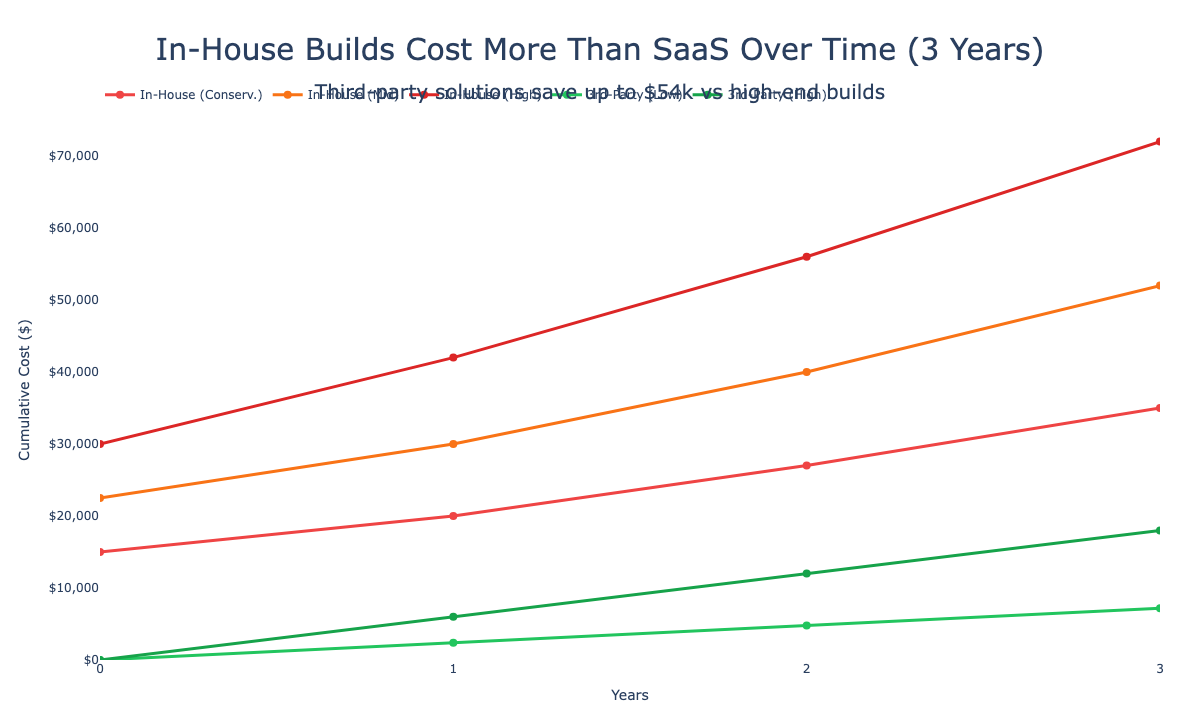
Here's how the numbers break down over three years:
| Cost Category | Build In-House | Buy Platform (Userorbit) |
|---|---|---|
| Initial build | $15,000-$30,000 | $0 (included) |
| Setup time | 4-8 weeks | <1 week |
| Annual maintenance | $3,000-$10,000+ | $0 (included) |
| Subscription | $0 | $2,400-$6,000/year |
| Engineering hours/quarter | 40-80 hours | 0-2 hours |
| 3-year total cost | $25,000-$60,000+ | $7,200-$18,000 |
The platform costs less and frees up engineering time for core product work.
The stronger argument isn't cost savings—it's focus. With a platform, your team builds features users pay for instead of maintaining tour infrastructure nobody gets excited about.
Activation Impact
Attention Insight implemented Userpilot and saw a 47% improvement in user activation. The Room used interactive walkthroughs and achieved 75% increase in new user activation within 10 days.
These aren't outliers. Purpose-built tooling with built-in analytics and optimization drives better outcomes than one-and-done in-house builds.
The difference: platforms enable continuous iteration. You notice drop-off at step 3, you fix it the same day. You notice mobile completion lagging desktop, you tweak the mobile experience. You notice enterprise users dropping off faster than SMB users, you segment and run different flows.
In-house tours optimize once. Platform-based tours optimize continuously.
Decision Framework
Use this checklist to decide:
Build in-house if:
- You have existing infrastructure tours can extend
- Your product has interaction models no vendor supports
- Tours are a core product feature, not just onboarding
- You have a dedicated team whose primary job is tours
- Compliance requirements block third-party tools (verified, not assumed)
Buy a platform if:
- You need tours live in weeks, not months
- Your team lacks bandwidth for ongoing maintenance
- You want to run frequent experiments on onboarding
- Analytics and personalization matter to your activation strategy
- Engineering time is better spent on core product
The heatmap below summarizes which approach tends to fit each scenario.
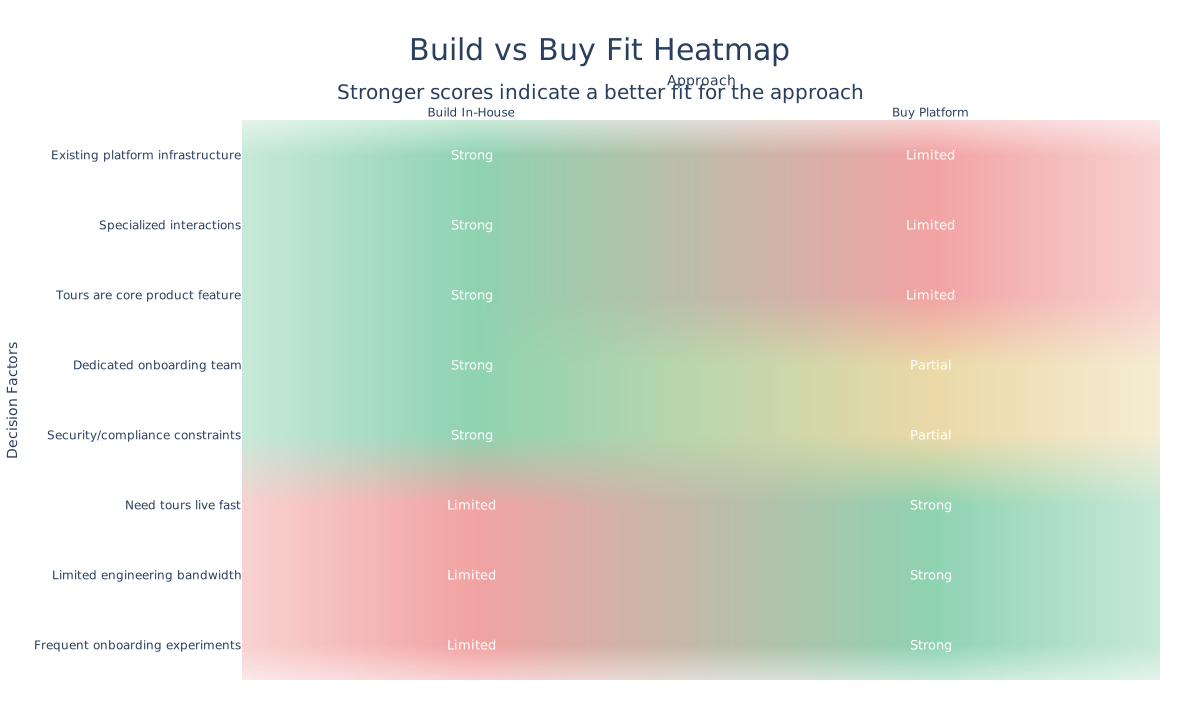
For the majority of product teams, platforms win on speed, cost, and focus. The teams that benefit from building in-house are the exceptions—and they usually know they're exceptions before they start the project.
What to Look for in a Platform
If you're evaluating third-party options, prioritize these:
Speed of implementation Build and launch your first tour in days, not weeks. If the platform requires heavy engineering integration, the benefit evaporates.
No-code builder Product managers and designers should build tours without filing engineering tickets. This is where speed advantage lives.
AI personalization Tours that treat all users the same underperform. Look for automatic adaptation based on behavior, role, or segment.
Analytics depth Completion rates are table stakes. You need funnel analysis, cohort tracking, and correlation with activation and retention metrics.
Maintenance-free infrastructure Mobile support, multi-language, browser compatibility, SDK updates—the platform handles it. You don't think about it.
Stack integration Native connections to Segment, Amplitude, Mixpanel, Salesforce, HubSpot. Integrations save weeks of custom work.
Transparent pricing Fixed monthly pricing. No surprise per-user fees. You know your cost upfront.
Final Thoughts
Building product tours in-house feels like control. You own the code. You customize everything. You don't depend on vendors.
What it often becomes: technical debt, context switching, and opportunity cost. Your engineers maintain tour infrastructure instead of shipping features. Your product managers file tickets instead of iterating directly. Your activation rate improves slowly because experiments require sprint planning.
Third-party platforms exist because this problem is solved. The tools are mature. The analytics are better than you'd build. The maintenance happens automatically.
Use them. Spend your engineering cycles on what makes your product unique. Let the platform handle onboarding infrastructure.
That's not settling—it's focus.
Ship tours in 30 minutes, not 30 days
Userorbit gives you AI-powered product tours, behavioral analytics, and no-code setup. Your team stays focused on the product.