Most product demos are built for one moment: the sales conversation.
Then the same workflow has to be explained again after signup. Marketing embeds a demo on the website. Product builds an onboarding tour. Support writes a help article. Customer success sends screenshots. Someone publishes a changelog. Someone else tries to work out whether users adopted the feature at all.
Userorbit is adding interactive product demos so teams can create one guided product story and reuse it across the full customer lifecycle.
The short version:
- Build a demo once for an important workflow.
- Publish it on your website, in onboarding, inside help docs, and from launch announcements.
- Connect demo engagement to adoption reporting so the launch does not end at "people viewed it."
What changes
Interactive demos turn a launch asset into reusable product education. Instead of rebuilding the same explanation for every channel, teams can carry the same guided workflow across the places where users need context.
| Before | Now |
|---|---|
| Website demos lived apart from onboarding and support. | The same demo can support evaluation, activation, help, and adoption. |
| Feature announcements told users what shipped. | Announcements can show the exact workflow users should try next. |
| Help docs depended on static screenshots that aged quickly. | Docs can include an interactive walkthrough beside the written steps. |
| Roadmap updates ended with "shipped." | Shipped roadmap items can link to a demo that proves the workflow is ready to use. |
| Demo views were hard to connect to product usage. | Teams can compare demo engagement with activation and adoption signals. |
This matters because product education is not a single channel. A user may first see a workflow before signup, need it again during onboarding, search for it in the help center two weeks later, and revisit it when a teammate asks what changed.
How it works
Create an interactive demo for a workflow, then reuse it across the Userorbit surfaces that already support launch, onboarding, and customer communication.
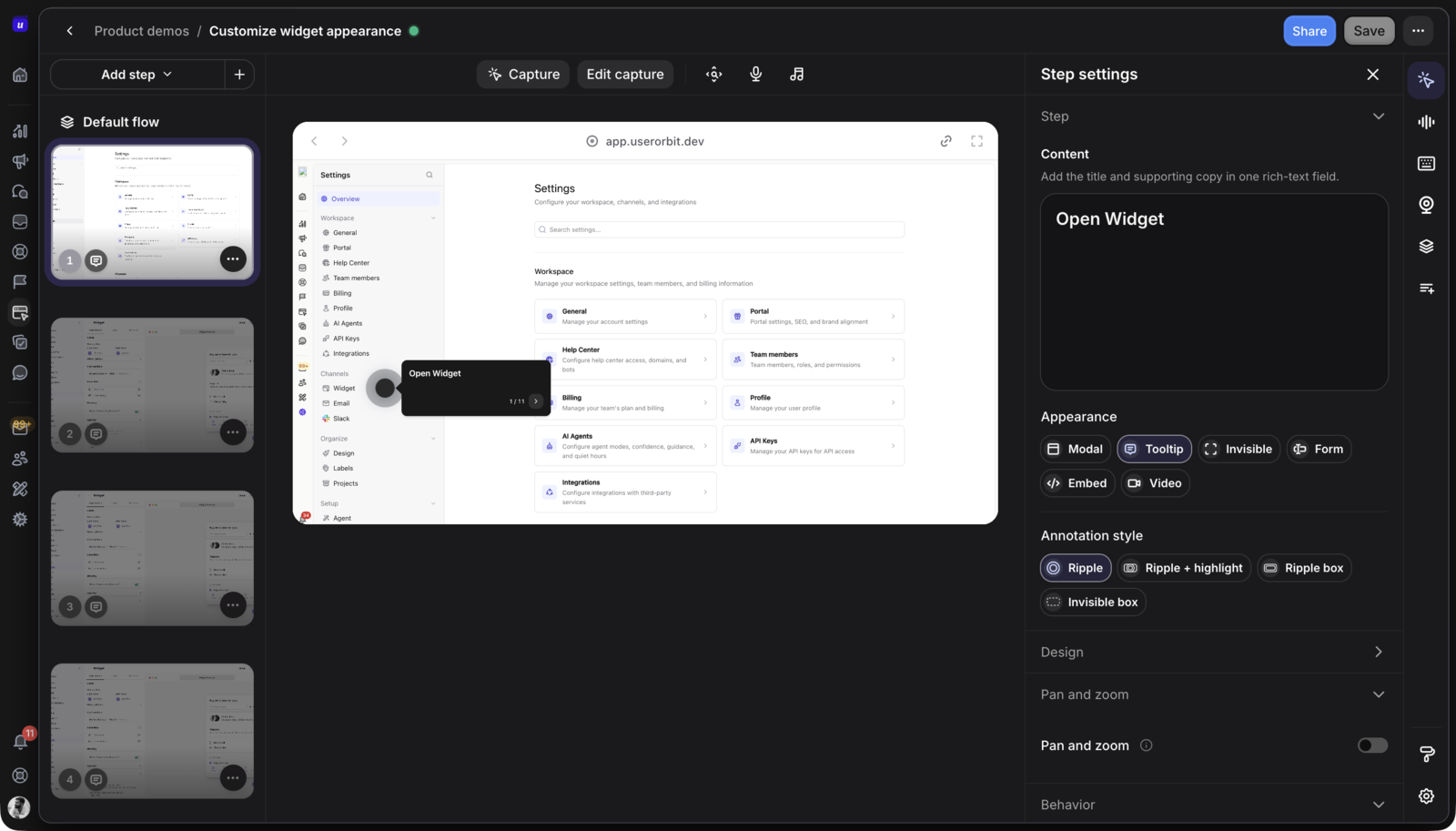
- Capture the workflow: Build the demo around the path users need to understand, such as setting up a dashboard, publishing an announcement, or completing an admin configuration.
- Add the right guidance: Use short prompts, steps, and context to explain what the user is seeing and what they should do next.
- Publish where the context belongs: Place the demo on a website page, onboarding checklist, help article, changelog entry, announcement, or roadmap update.
- Measure what happens after: Review who viewed the demo, where they saw it, which steps they completed, and whether they moved into the actual product workflow.
The goal is not to create more launch content. It is to stop recreating the same launch content in disconnected tools.
Where teams will use interactive demos
Interactive demos are useful when a workflow is valuable enough to explain visually and important enough to measure after launch.
- Marketing teams: Let prospects experience a key workflow before they create an account, without maintaining a separate sandbox or video library.
- Product teams: Add demos to feature announcements so users do not just learn that something shipped, they see what to try.
- Growth teams: Turn high-value demos into onboarding paths for the users or accounts most likely to benefit from the workflow.
- Support teams: Put interactive examples beside help articles so customers can understand the steps without opening a ticket.
- Customer success teams: Send demos after roadmap updates, renewal conversations, or adoption campaigns, then follow up with accounts that viewed but did not activate.
For example, a team launching a new reporting dashboard can use one demo across the whole rollout: on the reporting product page, inside the first-session checklist for admins, in the setup help article, from the changelog entry, and in the shipped roadmap update.
A better launch loop
A feature launch usually has a clean internal story: roadmap item, product spec, release, announcement, done.
Customers experience it differently. They see scattered pieces of the launch in whatever order their work creates: a website page before purchase, an in-app message after login, a help article during setup, a support response when something is unclear, and a customer success email when adoption is low.
Interactive demos make that loop more coherent.
Instead of treating every surface as a separate content project, Userorbit lets teams reuse one visual explanation across:
- Website pages for evaluation.
- Onboarding checklists for activation.
- Help center articles for self-serve setup.
- Announcements and changelogs for launch communication.
- Roadmap updates for closing the loop with voters and customers.
- Analytics for measuring whether the launch drove real usage.
That is the difference between broadcasting a feature and helping users adopt it.
What to measure after the demo goes live
Demo completion is useful, but it is not the whole story. A launch is only working if the right users understand the workflow and then use the feature in the product.
Userorbit interactive demos are designed to feed into adoption reporting, including:
- Who viewed the demo.
- Which channel drove the view.
- Which steps users completed.
- Which accounts engaged but did not activate.
- Which users moved from demo engagement into the product workflow.
This gives product, growth, and customer success teams a better follow-up motion. If an account watched the reporting demo but never created its first report, that is a different signal than an account that never saw the demo at all.
For the metric definitions, formulas, and demo-to-adoption handoff, see Interactive Demo Analytics: What to Track Beyond Views.
What to demo first
Start with one workflow that already creates friction or revenue impact. Do not turn every feature into a demo.
Good first candidates usually have at least two of these traits:
- The workflow influences signup, activation, retention, or expansion.
- Users need to see the interface before the value is obvious.
- The feature appears in support tickets, sales calls, onboarding calls, or roadmap requests.
- The workflow is reused across more than one channel.
- Adoption matters enough that someone will act on the reporting.
Admin setup, reporting, integrations, workflow automation, and major new product areas are usually better first demos than small settings or cosmetic changes.
Availability
Interactive product demos are being added to Userorbit for teams that want launches, onboarding, help content, and adoption reporting to work from the same product context.
The first version focuses on reusable demo creation, publishing demos across Userorbit surfaces, and connecting demo engagement with adoption reporting. Existing Userorbit customers can use demos to support new feature rollouts, onboarding campaigns, help center content, changelog posts, roadmap follow-up, and customer success outreach.
If you are evaluating Userorbit, interactive demos make it easier to show users what your product does before signup and keep guiding them after they become customers.