Help Scout's current public pricing is easy to summarize and easy to misread. The page shows a free plan for up to five users, Standard at $25 per user per month, Plus at $45, and Pro at $75 in its annual-billing view. It also lists AI Answers at $0.75 per resolution as an add-on.
The practical answer is simple: Free is a proof period, Standard fits a small email-led team, Plus is the useful comparison for a growing support operation, and Pro is for teams that need unlimited workflows, broader SLA controls, and security features. Model the inbox, Docs, user, and AI limits before treating the headline seat price as your total cost.
Pricing and plan limits checked on October 21, 2026. Prices are in USD. Confirm the live billing toggle and quote before purchase.
Help Scout pricing at a glance
The public pricing page currently shows these plan levels:
| Plan | Public price | Core limits and capabilities | Best starting point |
|---|---|---|---|
| Free | $0 | Up to 5 users, 1 Inbox, 1 Docs site, and 100 contacts per month | Testing a simple support motion |
| Standard | $25/user/month | Up to 25 users, multiple Inboxes, live chat and SMS, multiple Docs sites, one basic SLA policy, basic workflows, and AI Inbox assistance | Small teams moving beyond one shared mailbox |
| Plus | $45/user/month | Up to 50 users, advanced workflows, two advanced SLA policies, round-robin routing, customer portal, internal teams, and unlimited AI Drafts | Growing teams with more channels and volume |
| Pro | $75/user/month | Unlimited users with a 10-user minimum, unlimited workflows and SLA policies, multiple routing types, SSO/SAML, HIPAA, and higher-touch service | Larger or more governed support operations |
The page shows a -16% annual marker beside the displayed monthly-equivalent prices. Treat the numbers above as the public planning view, not a promise that every account will have the same billing terms. Taxes, add-on Inboxes or Docs sites, AI Answers resolutions, and negotiated services can change the invoice.
The decision in 60 seconds
Choose Free if you need one Inbox, one Docs site, and up to five users to prove that customers will use a shared support workflow. The contact allowance and single-Inbox limit make it a starting point rather than a long-term plan for most growing SaaS teams.
Choose Standard if email, self-service content, live chat, basic workflows, and a basic SLA policy cover the support job. It is the cleanest comparison for a small team that is leaving Gmail or an informal shared mailbox.
Choose Plus if several teammates need to work across multiple Inboxes, routing, workflows, customer groups, or advanced SLA policies. It is also the plan to model when AI Drafts and integrations with Salesforce, Jira, or HubSpot matter.
Choose Pro if security, unlimited workflow and SLA capacity, multiple routing types, HIPAA, SSO/SAML, or dedicated support is part of the buying requirement. The ten-user minimum makes Pro a poor fit for a small team even when the feature list looks attractive.
If the buying job includes in-app and Slack support connected to feedback and product decisions, compare the Plain pricing guide and Userorbit Support Suite before choosing an email-first helpdesk.
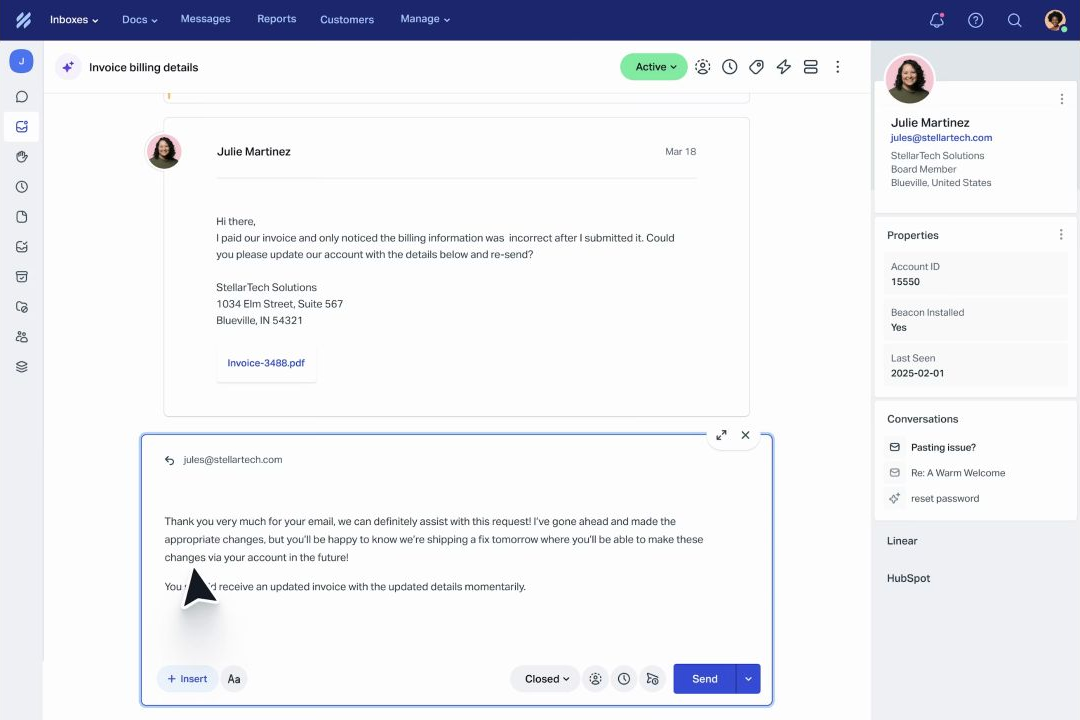
Help Scout shared inbox for customer support
What does Help Scout cost for a real team?
The table below annualizes the displayed monthly-equivalent price. It excludes taxes, extra Inboxes and Docs sites, AI Answers usage, integrations, and internal implementation time.
| Team shape | Plan | Monthly equivalent | Annualized planning cost | What the team gets |
|---|---|---|---|---|
| 3 support users | Standard | $75 | $900 | A small shared support operation with basic workflows and one basic SLA policy |
| 5 support users | Standard | $125 | $1,500 | The full Free user count plus more Inboxes, Docs capacity, and reporting history |
| 10 support users | Plus | $450 | $5,400 | Advanced workflows, two advanced SLA policies, routing, and cross-functional collaboration |
| 10 support users | Pro | $750 | $9,000 | Pro controls at its minimum user count, including unlimited workflows and SLA policies |
| 25 support users | Plus | $1,125 | $13,500 | The Plus user ceiling with five included Inboxes and advanced workflow capacity |
These are useful comparisons, not quotes. A 10-person team can spend $5,400 per year at the displayed Plus price before AI Answers, extra Docs sites, or other add-ons. A 10-person Pro account starts at $9,000 per year before those additions.
Free is useful, but it has a narrow job
Help Scout's Free plan includes up to five users, one Inbox, and one Docs site. It is a credible way to test:
- whether customers will use a searchable help center;
- whether the team can assign and resolve work from one Inbox;
- whether saved replies and basic reporting improve response consistency; and
- whether the support workflow is primarily email-led.
The important limits are operational. The Free plan has one Inbox, one Docs site, up to 100 contacts per month, and a small allowance for saved replies and tags. A product with several support addresses, multiple brands, or a growing customer base should model Standard before the free trial becomes the team's system of record.
Standard, Plus, and Pro: what changes
Standard: the small-team operating plan
Standard is the first paid plan to compare when a SaaS team wants more than a shared mailbox. The public page lists up to 25 users, two included Inboxes, live chat and SMS, multiple knowledge bases, one basic SLA policy, basic workflows, unlimited tags and saved replies, and an AI Inbox assistant.
Standard is a good fit when the team needs a consistent queue and searchable self-service content but does not yet need complex routing or several SLA policies. It is less compelling if Slack is a primary customer channel or if product and support teams need a native feedback and roadmap loop.
Plus: the complexity step
Plus adds the controls that become important when support is no longer one queue owned by one group. The public page lists up to 50 users, five included Inboxes, advanced workflows, two advanced SLA policies, a secure customer portal, round-robin routing, unlimited AI Drafts, internal teams, and company-level conversation grouping.
The additional price is not only buying more seats. It buys room for specialized Inboxes, more deliberate routing, and a team that has to coordinate across support, success, and operations.
Pro: governance and scale
Pro is listed at $75 per user per month with unlimited users and a 10-user minimum. It adds unlimited workflows and SLA policies, multiple routing types, SSO/SAML, HIPAA compliance, up to 50 light users, a dedicated onboarding specialist, and a strategic account manager.
That minimum matters. If you have four agents and need SSO, compare the cost of Pro's ten-user floor with a platform whose governance features are included at a smaller team size. If you have a larger service operation, Pro's controls may be more relevant than its entry price.
AI Answers is a separate meter
AI Answers is listed as a $0.75 per resolution add-on. Help Scout defines a resolution as a conversation resolved by AI without human assistance. The public page says the customer must receive an AI response and not escalate, ask for more help, or indicate that the issue remains unresolved.
Use three usage cases when forecasting:
| Monthly AI Answers resolutions | Monthly add-on | Annualized add-on |
|---|---|---|
| 100 | $75 | $900 |
| 500 | $375 | $4,500 |
| 1,000 | $750 | $9,000 |
Help Scout's page also describes a three-month free AI Answers trial and monthly spending caps. Treat the free period as an evaluation window, not as a permanent reduction in the operating cost.
AI Assist, AI Drafts, and AI Summarize are different capabilities from customer-facing AI Answers. Check which one the team needs before comparing the add-on price with an all-in-one platform.
The add-ons and limits that change the bill
Headline user pricing is only the first line of a Help Scout budget.
- Additional Inboxes: The public FAQ lists $10 per month per additional Inbox when paid annually, or $12 month to month.
- Additional Docs sites: The public FAQ lists $20 per month per additional site when paid annually, or $24 month to month.
- AI Answers: $0.75 per resolution, with prepaid discounts available.
- User count: Pro has a minimum of 10 users even though it lists unlimited users.
- Light users: Plus and Pro include light-user allowances, which can matter when product or engineering teammates need to collaborate without a full seat.
- Security and service: HIPAA, SSO/SAML, onboarding, and account support are tied to plan or add-on choices.
- Integration work: Salesforce, HubSpot, Jira, Linear, Aircall, API, webhooks, and OAuth connections still need ownership and maintenance.
For a serious budget, ask Help Scout to confirm the annual discount, Inbox and Docs quantities, AI resolution cap, light-user allowance, onboarding scope, and renewal terms in writing.
Implementation and migration checklist
Help Scout is lightweight to operate, but a support migration still changes the team's habits. Before switching:
- List every customer entry point: support addresses, chat, SMS, social channels, and Docs sites.
- Count current agents, occasional collaborators, and people who need reporting access.
- Export a representative set of conversations and verify users, companies, timestamps, tags, attachments, private notes, saved replies, and custom fields.
- Map old queues and automations to Inboxes, views, workflows, routing, and SLA policies.
- Decide which knowledge-base URLs must redirect and which articles need a content review before import.
- Pilot one customer segment and one Inbox before moving every support address.
- Set an AI Answers cap and review resolution quality before enabling it for the full volume.
The implementation is successful when agents can find context and customers can find the answer. Importing conversations without rebuilding ownership, routing, and self-service usually recreates the old problem in a new interface.
Help Scout vs Userorbit
Help Scout is a strong fit when the primary support job is a shared mailbox, knowledge base, live chat, workflows, and a manageable SLA model. It is especially easy to shortlist for founder-led or email-first SaaS support.
Userorbit is the stronger comparison when support is one part of a connected product workflow. The Support Suite brings in-app, help-center, email, and Slack requests into one inbox with AI-assisted replies, no-code workflows, customer context, saved views, tiers, and SLA tracking. A conversation can also feed feedback, roadmap work, or help content.
The pricing models are different. Userorbit lists Growth at $95 per month, Scale at $249 per month billed annually, and Enterprise as custom. The Support Suite is listed on Scale and Enterprise, not Growth. Help Scout prices the support operation by users and selected add-ons; Userorbit packages Support Suite inside a broader workspace with a MAU allowance and other product capabilities.
Choose Help Scout when you want a focused, email-first support system with public seat pricing. Choose Userorbit when the support conversation must remain connected to product adoption, feedback, roadmap decisions, and the help content that prevents the next request.
Best for and not best for
Help Scout is best for
- Small and midsize SaaS teams moving off a shared mailbox.
- Email-led support with a public or private knowledge base.
- Teams that want workflows, routing, and basic or advanced SLA coverage without a large service-operations rollout.
- Cross-functional collaborators who can use light-user access instead of a full seat.
Help Scout is not best for
- Teams whose most important customer channel is shared Slack support.
- Buyers that need a native connection from support conversations to feedback and roadmap decisions.
- Small teams that require Pro governance features but cannot justify its ten-user minimum.
- Organizations that need a phone-first contact center or complex enterprise service operations.
Choose Userorbit if
- Requests start in-app, in a help center, by email, or in Slack.
- Support and product teams need the same customer context.
- Recurring support questions should become feedback, roadmap input, help content, or adoption work.
- You want Support Suite beside onboarding, announcements, analytics, and other Userorbit workflows.
Choose something else if
- Email-first support and a simple help center are the whole requirement.
- You need phone, workforce management, or broad service-desk governance before product context.
- Your team prefers a per-user support product and does not need a connected product-adoption suite.
Official sources checked
- Help Scout pricing
- Help Scout customer service software
- Userorbit pricing
- Userorbit Support Suite
- Userorbit Support Suite plan access
Help Scout pricing FAQ
Short answers about Help Scout plans, limits, AI Answers, and support-team fit.