

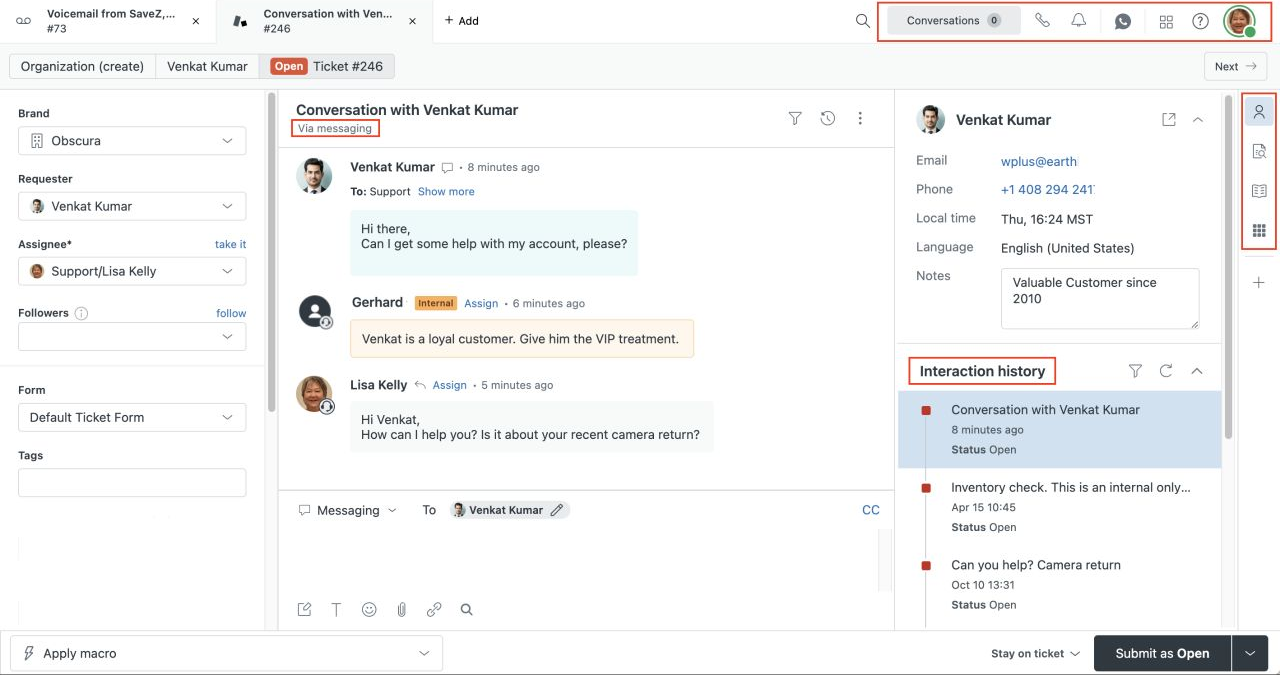








Zendesk is a strong choice for formal service operations, omnichannel routing, governance, and a large support organization. It is not the best fit for every SaaS team. The right Zendesk alternative depends on what you are trying to preserve: a product-connected support loop, customer conversations in Slack, a programmable inbox, a lighter email workflow, predictable workspace pricing, or control over deployment.
Short answer: Userorbit is the strongest fit when a product-led SaaS team wants support connected to in-app adoption, feedback, roadmaps, announcements, and help content. Intercom fits teams centered on Messenger and Fin. Plain and Pylon fit engineering-led or customer-channel support. Help Scout and Front fit lighter shared-inbox operations. Crisp fits workspace-based pricing, and Chatwoot fits teams that need an open-source or self-hosted path.
Research checked October 16, 2026. Prices are in USD and should be confirmed with each vendor before purchase.
The best Zendesk alternatives at a glance
| Alternative | Best fit | What changes from Zendesk | Public pricing signal |
|---|---|---|---|
| Userorbit | Product-led SaaS support connected to product work | Support sits beside feedback, roadmaps, announcements, help, onboarding, and analytics | Scale $249/month billed annually; Support Suite is on Scale and Enterprise |
| Intercom | Customer messaging and AI-led resolution | Messenger, Fin, outbound messaging, and support campaigns are the center of the model | Essential $29/seat/month annually plus Fin from $0.99/outcome |
| Plain | Engineering-led B2B support | Programmable support with Slack, email, in-app channels, and developer workflows | Foundation $45/user/month annually; Horizon $99; Frontier custom |
| Pylon | High-touch B2B support in customer channels | Slack, email, chat, account context, and agentic credits in one customer-channel workflow | Quote-led; seats and agentic credits determine the bill |
| Help Scout | Email-first support with a lighter admin model | Mailbox, help center, live chat, workflows, and focused SLA coverage | Standard $25/user/month; Plus $45; Pro $75 |
| Front | Collaborative support and operations | Shared inboxes, rules, reporting, and omnichannel collaboration | Professional $65/seat/month; Enterprise $105 |
| Crisp | Small teams that prefer workspace pricing | One workspace price with included seats, automation, and AI credits | Mini $45/workspace/month; Essentials $95; Plus $295 |
| Chatwoot | Self-hosting and data control | Open-source product with managed cloud and deployment-control paths | Hacker free up to 2 agents; Startups $19/agent/month; Business $39 |
No table can decide this purchase by itself. Zendesk has a wider service-operations surface than many alternatives, while a smaller platform may give a SaaS team more direct product context or less administrative overhead. Compare the workflow you need to run every week, not only the number of checkboxes in a feature matrix.
What to evaluate before leaving Zendesk
Start with the operating problem that caused the search. A lower seat price is not a win if you lose routing, reporting, history, or the channels customers actually use.
- Customer entry points: Do requests begin in-app, by email, in Slack or Teams, through a help center, in chat, or by phone?
- Ownership: Can the team assign work, save views, add private context, set priorities, and see what is still waiting?
- Product context: Can an agent see the account, plan, product activity, previous requests, and related feedback without switching systems?
- Service controls: Do you need formal SLAs, business hours, skills-based routing, IVR, audit logs, custom permissions, or sandbox environments?
- AI economics: Is AI priced by seat, outcome, credit, conversation, or included usage? Does it assist an agent, answer a customer, or take actions?
- Migration depth: Which tickets, users, organizations, articles, attachments, fields, automations, and reports must move?
- The next workflow: After a reply, should the conversation become a feedback item, roadmap decision, help article, onboarding change, or announcement?
The last question is the dividing line between a service desk and a product-connected support system. If support evidence disappears when a ticket closes, product and customer-success teams have to reconstruct the context later.
Which Zendesk alternative fits your team?
| Buyer situation | Start with | Why |
|---|---|---|
| Product-led SaaS with in-app questions and adoption work | Userorbit or Intercom | Keep customer context close to the product, then compare whether the next step is product learning or customer messaging |
| Engineering-led B2B SaaS with Slack customers | Plain, Pylon, or Userorbit | Treat customer channels as support work without losing engineering or product context |
| Small team moving beyond one shared inbox | Help Scout or Crisp | Add ownership, searchable help, workflows, and light automation without buying a full service-operations stack |
| Cross-functional support and operations team | Front or Userorbit | Let support, success, product, and operations collaborate while keeping a clear system of record |
| Formal service organization with governance requirements | Zendesk or Front Enterprise | Prioritize permissions, reporting, routing, service controls, and operational maturity |
| Team with a real deployment or data-control requirement | Chatwoot | Trade managed-service convenience for infrastructure ownership and control |
1. Userorbit — best for support connected to product work
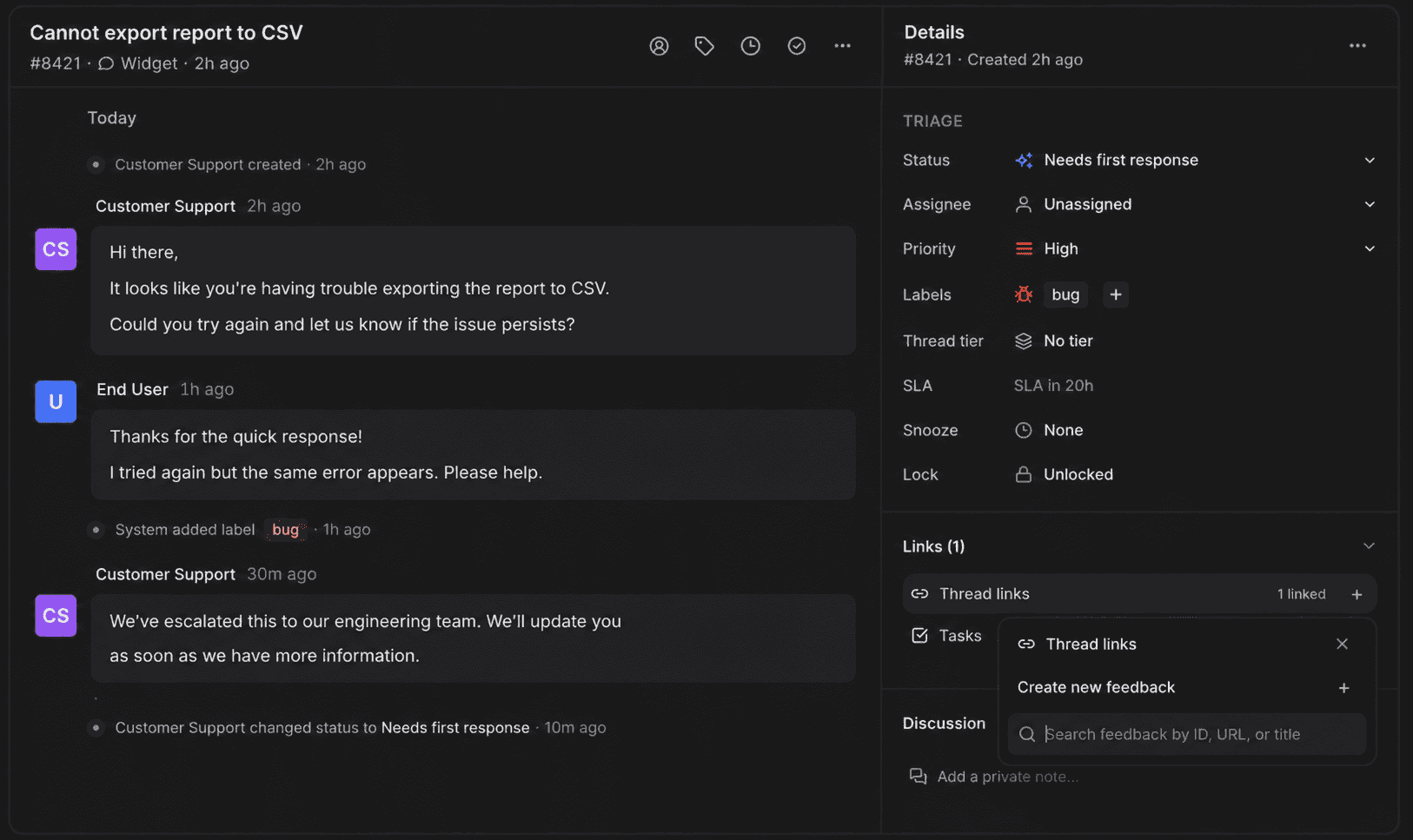
Userorbit is the strongest Zendesk alternative when support is one part of a broader product-adoption system. The Support Suite combines a shared inbox for in-app, help-center, email, and Slack requests with AI assistance, no-code workflows, customer context, support tiers, and SLA tracking. The product connection is the differentiator: a conversation can become structured feedback, roadmap context, a help article, or an adoption change.
Userorbit support inbox with synthetic requests across customer channels


Best for: Product-led SaaS teams that want customer support to inform feedback, roadmaps, announcements, onboarding, and help content.
What stands out: Userorbit keeps the support conversation beside the product workflow. Support teams can work across in-app, help-center, email, and Slack entry points, while product teams can use the context after the reply.
Watch-outs: Userorbit is not the best fit if your buying requirement starts with native phone operations, a mature contact-center stack, or the broadest enterprise service-governance surface. Confirm the exact security, retention, SLA, and deployment requirements with the team.
Pricing model: Scale is $249 per month billed annually and includes the Support Suite. Enterprise is custom. The Userorbit pricing page lists current plan boundaries, while the Support Suite product page describes the inbox, channels, AI, workflows, and SLA features.
Migration note: Plan the move around the operating model, not only the ticket export. Map channels, fields, labels, tiers, workflows, help content, feedback links, and the customer context agents need. Run a small pilot before changing every customer entry point.
2. Intercom — best for customer messaging and Fin
Intercom is a strong alternative when the main job is customer messaging, in-app conversations, outbound communication, and AI-assisted resolution. It is a different operating model from Zendesk's formal service desk: Messenger and Fin are central, while channel and outcome usage can make the bill move.
Best for: SaaS teams that want Messenger, a shared inbox, a public help center, outbound messaging, workflows, and Fin in one platform.
What stands out: Intercom's Essential plan is $29 per seat per month on annual billing, Advanced is $85, and Expert is $132. Fin is priced from $0.99 per outcome, and Intercom says an outcome is counted once when the customer confirms resolution, does not ask for more help, or Fin completes a procedure.
Watch-outs: Compare outcome volume, paid channels, seat types, Lite-seat allowances, and the migration of historical conversations—not just the seat price. Teams that need formal service governance or a product-feedback loop may still need adjacent systems.
Migration note: Use the best Intercom alternatives for B2B SaaS guide alongside Intercom's pricing page when comparing customer-channel, AI, and migration fit.
3. Plain — best for programmable B2B support
Plain is a good Zendesk alternative for technical SaaS companies that want support to behave like a programmable product surface. Its public pricing page lists Slack, email, and in-app channels, Linear and Jira integrations, AI workflows, and a help center in the Foundation plan.
Best for: Developer-tool and engineering-led B2B SaaS teams that work in Slack, email, and in-app support channels.
What stands out: Foundation is $45 per user per month billed annually, Horizon is $99 per user per month billed annually, and Frontier is custom. The plans include a monthly credit model, so seat cost is only one part of the comparison.
Watch-outs: Plain is a focused support system, not a full product-adoption suite. If your next step after a conversation is a roadmap update, onboarding change, or announcement, validate the integration and ownership model before treating it as a replacement for the surrounding workflow.
Migration note: Inventory customer identity, company data, conversations, attachments, tags, internal notes, and integrations. Test the exact objects your team needs before setting a cutover date.
4. Pylon — best for high-touch customer channels
Pylon fits B2B companies where support already happens in Slack, email, chat, and account-level customer workflows. Its pricing page describes unified ticketing across Slack, email, and chat, plus a seat and agentic-credit model. Account Intelligence is listed at $10 per customer account per month, and Phone at $35 per seat per month, while the core platform requires a quote.
Best for: Customer-success and support teams handling strategic accounts in Slack or other business channels.
What stands out: Pylon treats customer channels as the support surface instead of forcing every request into a consumer-style chat or a traditional ticket portal. Its platform includes ticketing, a knowledge base, surveys, and analytics.
Watch-outs: The quote-led core price makes a side-by-side budget harder at the start. Ask the vendor to separate seats, agentic credits, accounts, phone, implementation, migration, and support.
Migration note: Preserve the customer-channel relationship and account history first. Validate which Slack or Teams threads become tickets, how identities map, and where historical conversations remain searchable after cutover.
5. Help Scout — best for lighter email-first support
Help Scout is a practical option when the team wants a shared mailbox, knowledge base, live chat, workflows, and limited service controls without adopting a larger service-operations platform.
Best for: Small and midsize SaaS teams whose support motion is primarily email and self-service content.
What stands out: Standard is $25 per user per month, Plus is $45, and Pro is $75 on the current public pricing page. Standard includes multiple inboxes, live chat and SMS, a basic SLA policy, basic workflows, and an AI inbox assistant.
Watch-outs: Teams that need customer-channel Slack support, deep routing, advanced governance, or a tight product-feedback loop may need integrations or another platform. Check user, inbox, contact, and AI limits at the next team size.
Migration note: Export a representative set of conversations before deciding. Check users, companies, timestamps, tags, attachments, internal notes, saved replies, knowledge-base URLs, and SLA history rather than assuming every object maps cleanly.
6. Front — best for collaborative operations
Front works well when support is shared with success, operations, or account teams and email remains an important part of the customer relationship. It has a more collaborative workspace feel than a conventional ticketing system, while still offering rules, reporting, knowledge, and multiple channels on higher tiers.
Best for: Cross-functional teams that want a shared inbox with structured ownership and operational collaboration.
What stands out: Front's public pricing lists Professional at $65 per seat per month and Enterprise at $105. Professional adds omnichannel support, macros, advanced analytics, multiple workspaces, SSO, and SCIM; Enterprise adds unlimited rules and macros, custom roles, and included AI Copilot, QA, and CSAT.
Watch-outs: Per-seat pricing can become material when product, success, and operations teammates all need full access. Product feedback, onboarding, and roadmap communication remain adjacent workflows unless the team designs the integrations carefully.
Migration note: Decide which shared inboxes, rules, tags, analytics, and customer records are essential before migrating. Test collaboration with non-support teammates so the new system does not recreate the same context gaps in a different interface.
7. Crisp — best for workspace-based pricing
Crisp is a useful alternative for teams that prefer a workspace price with included seats instead of a full per-agent model. It combines shared conversations, automation, knowledge, and AI-oriented features in a package aimed at smaller support operations.
Best for: Startups and small teams that want a broad support workspace with predictable included seats.
What stands out: Crisp lists Mini at $45 per workspace per month with four included agents, Essentials at $95 with 10 included seats, and Plus at $295 with 20 or more seats. The plans also have included automated-conversation and AI-credit allowances.
Watch-outs: Workspace pricing does not remove usage limits. Compare agent allowances, profiles, automated conversations, AI credits, channels, reporting, and the migration path for historical data.
Migration note: Keep Zendesk as a read-only archive until the team has tested customer identity, conversation history, attachments, automation, and reporting in the new workspace.
8. Chatwoot — best for self-hosting and data control
Chatwoot is the clearest alternative when a team has a real requirement for open-source software, deployment control, or data ownership. It offers managed cloud plans and a separate self-hosted path; the operational tradeoff is part of the product decision.
Best for: Technical teams willing to own infrastructure, upgrades, monitoring, backups, and security in exchange for deployment control.
What stands out: Chatwoot's current cloud page lists Hacker at $0 per agent per month for up to two agents and 500 conversations per month, Startups at $19, Business at $39, and Enterprise at $99 per agent per month. The product also documents API export for conversations, contacts, and other data.
Watch-outs: A free or open-source license does not make the operating model free. Budget for hosting, maintenance, security review, upgrades, observability, backups, and the engineering time required to keep support available.
Migration note: Run a self-hosted proof of concept with the same retention, identity, channel, and export requirements you use in production. Confirm which Zendesk objects will move through APIs or third-party tools and which will stay in the archive.
Compare the cost at a realistic team size
The following is a base-subscription comparison for a ten-person support team. It is not a quote and excludes taxes, implementation, add-ons, AI outcomes, usage credits, phone, and channel fees. Workspace-priced products are shown as one workspace where the listed seats cover the example team.
| Platform | Ten-seat base estimate | What can change the bill |
|---|---|---|
| Zendesk Support Team | $190/month billed annually | Monthly billing, Suite features, AI resolutions, Copilot, Workforce, Contact Center, and other add-ons |
| Userorbit Scale | $249/month billed annually | Plan limits, Enterprise requirements, and premium usage |
| Intercom Essential | $290/month billed annually | Fin outcomes, paid channels, seat type, and messaging usage |
| Plain Foundation | $450/month billed annually | Horizon or Frontier, credits, seats, and governance requirements |
| Help Scout Standard | $250/month | Plus or Pro, inbox limits, users, contacts, and AI usage |
| Front Professional | $650/month | Enterprise, add-ons, and extra seats |
| Crisp Essentials | $95/workspace/month | Additional workspaces, included seats, automated conversations, and AI credits |
| Chatwoot Startups | $190/month | Business or Enterprise controls, AI credits, and managed versus self-hosted operations |
This is why “cheaper than Zendesk” is not a complete recommendation. A team with five agents and 20,000 monthly AI outcomes has a different cost model from a team with 10 agents and no automation. Calculate the full operating cost at low, expected, and high volume.
A practical Zendesk migration plan
Zendesk's migration guidance says that tickets are imported through the Ticket Import API, while users, organizations, and Help Center articles use their own API or bulk-import paths. Zendesk also notes that first-reply and first-resolution metrics are not imported for tickets and that triggers do not run on imported tickets. That makes migration design part of the buying decision.
Use a staged plan:
- Inventory the current service model. List channels, forms, fields, groups, views, macros, triggers, automations, SLAs, roles, help-center content, integrations, reports, and AI workflows.
- Separate system-of-record data from archive data. Decide which conversations, users, organizations, attachments, internal notes, and articles need to be operational on day one.
- Map the destination model. Translate Zendesk fields, tags, statuses, groups, routing, identities, and knowledge-base structure into the alternative's objects before importing anything.
- Pilot with real cases. Test one customer segment, one channel, one escalation path, and one reporting cycle. Include a missed-reply and SLA-breach scenario.
- Cut over in a controlled window. Freeze configuration changes, preserve the Zendesk archive, redirect entry points, and verify replies in every customer channel.
- Measure the first month. Track missed conversations, first-response time, resolution time, reopen rate, escalation quality, AI usage, customer satisfaction, and manual work.
Do not treat “we can import tickets” as “the migration is complete.” The hard parts are usually identity mapping, attachments, private context, automations, reporting continuity, and the workflow after a conversation becomes product evidence.
When Zendesk is still the better choice
Keep Zendesk on the shortlist when you need:
- formal omnichannel service operations with ticketing, messaging, voice, and mature routing
- governance, custom roles, auditability, sandbox testing, and larger-scale administration
- established reporting and a large integration ecosystem
- a support organization that already knows how to operate Zendesk efficiently
- a service desk that is intentionally separate from product feedback and adoption systems
The goal is not to replace a capable platform just because an alternative has a lower starting price. Switch when the new operating model solves a problem that is expensive enough to justify migration.
When Userorbit is the better shortlist candidate
Choose Userorbit when:
- support requests begin inside the product or help center as well as by email and Slack
- the same team owns onboarding, feedback, roadmaps, announcements, help content, or adoption
- recurring support questions should become structured product evidence instead of copied notes
- you want AI assistance and no-code support workflows without separating the support loop from the product loop
- the team values a focused SaaS implementation over a full contact-center program
Choose something else when phone operations, broad service governance, a mature enterprise marketplace, or a self-hosted deployment is the primary requirement. A credible shortlist is more useful than a universal winner.
Questions to ask each Zendesk alternative
Before booking a demo, ask every vendor to show the same workflow:
- A customer asks a product question in the channel your team uses most.
- An agent sees identity, account, plan, history, and related context.
- The request is routed, assigned, prioritized, and escalated against a target.
- An internal teammate joins without exposing private discussion to the customer.
- The customer receives a reply in the originating channel.
- The team turns the recurring issue into documentation, feedback, or roadmap work.
- An administrator exports the conversation and explains the retention and reporting model.
Compare the result at your real volume and team size. This exercise reveals more than a generic feature checklist.
Zendesk alternatives FAQ
Zendesk alternatives FAQ
Short answers for SaaS teams comparing support channels, product context, AI economics, and migration effort in 2026.