








Every product team has the same problem. Feedback piles up faster than anyone can read it. The board fills with duplicates, stale items nobody touched, and high-signal requests buried under noise. Triaging it is important — it directly affects roadmap confidence and user trust — but it's also grinding, repetitive work that rarely makes it to the top of a PM's priority list.
The solution is simple in principle: hand the triage work to an agent and get out of the way. This article shows you exactly how to do that using Hermes Agent and Userorbit.
The triage tax most PMs are paying
Research from Atlassian, GitLab, and independent PM communities consistently shows that product managers spend somewhere between three and five hours per week on pure inbox management: reading new feedback, deciding where it belongs, deduplicating items, updating statuses, and summarising what came in for the rest of the team.
That's close to a full working day every week — before any actual prioritisation or strategic thinking has happened. It's the overhead beneath the overhead.
What makes it worse is the asymmetry. Missing a high-signal item in the triage backlog is easy. A single bug report that ten customers submitted individually looks like ten separate requests unless someone reads all of them and spots the pattern. Most teams don't have that bandwidth, so the pattern goes unnoticed and the item stays in "New" for weeks.
Automated triage doesn't replace product judgment — it removes the mechanical part so you can apply judgment where it actually matters.
What Hermes + Userorbit can do for you
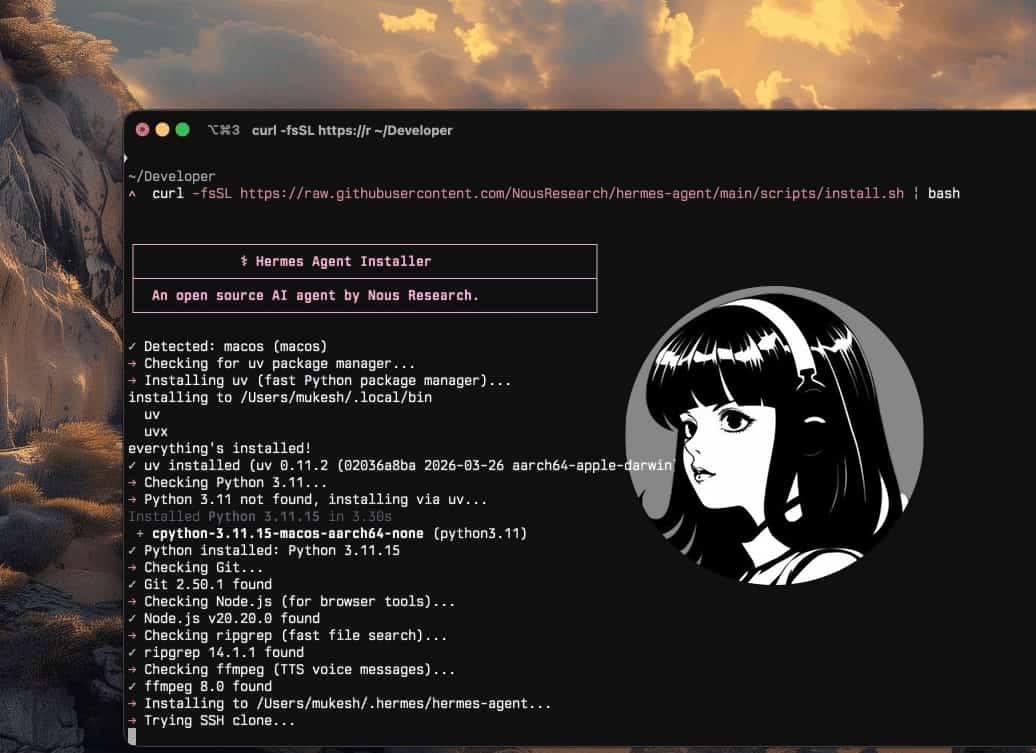
Hermes Agent is an autonomous AI agent from Nous Research that runs as a daemon on your own infrastructure. It has long-term memory, a persistent skill system, a built-in cron scheduler, and messaging gateways for Telegram, Slack, Discord, and others.
Userorbit is an AI-first product growth platform with a REST API covering feedback boards, roadmaps, announcements, and help docs. The Userorbit skill for Hermes wraps that API into a set of tools the agent can call directly — no custom code required.
Together, they let you run a fully automated daily triage workflow:
- Pull all feedback submitted in the last 24 hours
- Group items by theme using the agent's own reasoning
- Route each item to the correct board
- Update statuses — new items move to
in_review, obvious duplicates get closed - Add internal comments explaining triage decisions
- Upvote high-signal items so they surface naturally
- Send a digest to your Slack or Telegram channel each morning
The PM wakes up to a clean inbox and a summary, not a wall of unread noise.
Setting up the Userorbit skill
If you haven't already set up Hermes Agent, start with the Getting Started guide. Once Hermes is running, installing the Userorbit skill takes about two minutes.
hermes skills install userorbit/skill/userorbitFor production triage, run this from a dedicated profile instead of your default Hermes agent:
hermes profile create feedback-triage --clone
hermes -p feedback-triage skills install userorbit/skill/userorbit
That profile should have its own SOUL.md with narrow authority: classify, route, comment, and summarize feedback; ask before publishing customer-facing responses; never change roadmap status unless the rule is explicit. Keeping triage separate from research or release-writing profiles also makes its memory easier to audit.
Then add your credentials. Find them in Userorbit under Settings → API:
export USERORBIT_API_KEY=your_api_key_here
export USERORBIT_TEAM_ID=your_team_id_here
Add both to ~/.hermes/.env so they persist across sessions and cron runs. Verify the connection:
hermes
> List my Userorbit feedback boards
Hermes should return your board list. If it does, you're ready to build the automation.
How the daily triage cron works, step by step
Step 1 — Hermes wakes up
The built-in cron scheduler in Hermes runs prompts on a schedule without any external cron daemon. You configure it once and it fires every morning at a time you choose:
hermes cron add "0 8 * * *" "Run the daily Userorbit feedback triage"At 8 AM every day, Hermes picks up the task, loads the Userorbit skill from memory, and starts working.
Step 2 — Pull all feedback from the last 24 hours
The first thing Hermes does is fetch recent feedback using feedbacks.list sorted by newest, filtered to the last 24-hour window. It pages through the results automatically and collects everything into working memory before doing any analysis.
Hermes handles rate limits and pagination natively — you don't need to write any retry logic.
Step 3 — Group by theme using reasoning
This is where the agent earns its keep. Hermes reads all the items and identifies recurring themes: multiple reports about the same missing feature, clusters of confusion around the same onboarding step, billing complaints that are really the same edge case described differently.
It groups items by theme and assigns a confidence score to each cluster. High-confidence clusters (e.g. five people independently requesting dark mode using different phrasing) are treated as strong signals.
Step 4 — Route items to the right board
Using the feedback-boards.list tool, Hermes pulls your board structure and uses it as a taxonomy to route each item. A feedback item about payment failures goes to the billing board. A request for a new integration goes to the integrations board. Items that don't fit a known board get flagged for human review rather than silently dropped.
Step 5 — Update statuses
New items get moved to in_review. Items the agent identified as duplicates get marked closed. Items in active development that a user re-reported get linked to the in-progress item and marked in_progress.
All status changes are made via feedbacks.update — a single API call per item, batched sequentially to stay within rate limits.
Step 6 — Add internal triage comments
For every non-trivial decision, Hermes adds a private internal comment explaining its reasoning. This is the audit trail that makes the automation trustworthy.
A typical internal comment looks like:
Triage note (automated): Appears to be a duplicate of #312 ("Export to CSV fails on Safari"). Same error description, same browser. Closing this item and linking to the original. If this assessment is incorrect, reopen and add context.
These comments are private — users never see them. But your team can read the reasoning behind every triage decision and override it in seconds if the agent got it wrong.
Step 7 — Upvote high-signal items
Items that appear in multiple clusters, or that match open roadmap priorities, get upvoted via feedbacks.vote. This keeps the vote counts meaningful as a signal — rather than letting them drift based purely on which users happened to vote manually.
Step 8 — Send the morning digest
Finally, Hermes composes a digest summary and sends it to your configured Telegram or Slack channel:
📋 Daily Feedback Digest — April 7

🆕 18 new items received
✅ 11 triaged automatically
🔁 4 duplicates closed (linked to originals)
⭐ 3 high-signal items upvoted

Top themes today:
  • Dark mode requests (6 items, board: UI/UX)
  • CSV export errors on Safari (3 items, merged → #312)
  • Onboarding step 3 confusion (2 items, board: Onboarding)

2 items need human review — no confident board match.
Full triage log: https://app.userorbit.com/feedback
The PM reads this in 90 seconds and knows exactly what happened overnight.
The exact cron prompt to set this up
Paste this into Hermes to configure the full daily triage job. Adjust the board names, Slack/Telegram channel, and timing as needed for your setup:
Every morning at 8 AM, run a full Userorbit feedback triage: fetch all feedback submitted in the last 24 hours sorted by newest, group items by theme using your reasoning, route each item to the most appropriate board (Bug Reports, Feature Requests, UI/UX, Onboarding, Billing, Integrations — flag anything that doesn't fit for human review), move all new items to in_review status, close obvious duplicates and add a private internal comment on each explaining which existing item it duplicates and why, upvote any item that appears in two or more theme clusters or that matches a roadmap priority I've told you about, then send a summary digest to my Telegram with counts by action taken and a list of the top three themes.
That's a single natural-language prompt. Hermes translates it into the correct sequence of Userorbit API calls and runs it on schedule without any further input.
Example prompts for interactive triage
The cron job handles the daily routine. For deeper dives, run triage interactively from the CLI or your messaging gateway:
Catch up on a backlog:
Triage all new feedback from the last 7 days. Group by theme, close duplicates with internal comments, and give me a summary of what's left for my review.
Feature-specific analysis:
Find all feedback mentioning our CSV export feature and group by sentiment — positive, negative, and neutral. Tell me what users love about it and what's frustrating them.
Board-level cleanup:
Review everything in the Billing board with status "New" or "In Review" that's older than 30 days. Close any duplicates you find, flag items that should be escalated, and add a triage comment to each one.
Duplicate audit:
Scan all open feedback across all boards and identify likely duplicates. Show me the clusters before making any changes so I can review your groupings.
Roadmap signal extraction:
Pull the top 20 feedback items by votes and cross-reference them against our planned roadmap items. Which high-vote requests aren't covered by anything we've planned?
Each prompt runs in the same way — Hermes calls the relevant Userorbit endpoints, reasons over the results, and either takes action or asks for confirmation depending on how you've configured the approval flow.
Why this saves 3–5 hours per week
The time savings come from eliminating five distinct categories of manual work:
| Task | Manual time | Automated |
|---|---|---|
| Reading and categorising new items | 45–90 min/week | ✅ |
| Deduplication pass across boards | 30–60 min/week | ✅ |
| Status updates (batch) | 20–40 min/week | ✅ |
| Writing triage notes for the team | 15–30 min/week | ✅ |
| Preparing weekly digest | 20–45 min/week | ✅ |
The numbers align with what PM communities report: inbox management consumes between 8% and 12% of a typical product manager's working week. Automating the mechanical parts of it — the reading, sorting, deduplicating, and status-updating — recovers most of that budget without removing any judgment from the process.
What you keep doing as a PM: reviewing the digest, overriding agent decisions you disagree with, setting priorities that inform the agent's upvoting logic, and doing the actual strategic work that the recovered hours make room for.
Tips for rolling this out safely
Start in read-only mode
Before enabling status updates and comments, run the prompt in observation-only mode for a week:
Fetch all new feedback from the last 24 hours and tell me how you would triage it — what you'd group together, what you'd close as duplicates, and what you'd route to which board. Don't make any changes yet.
Review the outputs each morning. After five days you'll have a clear sense of how well the agent's reasoning matches your own judgment and where it needs additional context.
Add product context to improve accuracy
Hermes gets better triage results when it knows your product. Before running the cron, give it context:
Remember that our CSV export feature is in active development. Any feedback about it should go to the "Feature Requests" board with status "in_progress", not "in_review".
Our "Billing" board is only for payment and subscription issues. Feature requests that happen to mention pricing should go to "Feature Requests".
These one-time context injections go into Hermes's long-term memory and persist across all future sessions and cron runs.
Enable writes gradually
A safe rollout sequence:
- Week 1 — Read-only: agent reports what it would do, no changes made
- Week 2 — Enable board routing only (no status updates or comments)
- Week 3 — Enable status updates for duplicates only
- Week 4 — Enable full triage including internal comments and upvotes
Each stage gives you a chance to catch edge cases before giving the agent broader permissions.
Review the internal comments
Once you enable writes, spot-check the internal triage comments daily for the first two weeks. They're the most direct window into the agent's reasoning. If you see a pattern of incorrect duplicate identification — for example, if Hermes is closing items that are actually distinct — you can correct it with a single instruction:
When marking something as a duplicate, require at least two of these three conditions to be true: same described error, same board, mentioned by at least two different users. If only one condition is met, add an internal comment flagging it as a possible duplicate but leave the status as "in_review".
Hermes will apply that rule from the next run forward and save it as a skill refinement.
Test the triage skill before expanding scope
After the first week, turn the observed edge cases into a small evaluation set:
- Duplicate-looking feedback that should stay separate
- Two differently worded reports that really are the same bug
- Enterprise feedback that should trigger escalation
- Vague feedback that should stay in human review
Run the triage prompt against those examples whenever you update the skill. If you later adopt Hermes's GEPA-style self-evolution flow, use these examples as the guardrail: proposed skill improvements should improve the evaluation set before they get permission to edit live feedback.
Building on top of the triage loop
Once the daily triage is running reliably, it becomes the foundation for more sophisticated workflows.
Weekly roadmap sync: Every Friday, Hermes cross-references the week's triage results against your roadmap items in Userorbit and sends a summary of which planned items have corresponding feedback volume and which open feedback has no roadmap coverage.
Release-day monitoring: Before and after a release, switch the cron to run every four hours instead of once a day. Hermes catches regression reports and unexpected user confusion the same day they arrive, not the next morning.
Multi-board deduplication: Run a weekly cross-board audit that finds items split across boards that should be merged. Feedback submitted to the wrong board by users is common — automated cross-board deduplication prevents roadmap signal from being diluted.
Escalation routing: Teach Hermes which user segments or feedback sources should always trigger immediate Slack alerts rather than waiting for the morning digest.
What comes next
This article is part of a series on running Hermes as an autonomous AI product manager. If you're just getting started, the Getting Started with Hermes Agent guide covers installation, model setup, and your first Userorbit connection.
The next piece in this series covers roadmap automation — using Hermes to cross-reference feedback volume, engineering capacity signals, and strategic priorities to suggest roadmap sequencing. That one gets into multi-step reasoning across multiple Userorbit resource types and is worth reading once the triage loop is stable.
Reference links
- Hermes Agent documentation — cron scheduler, skills, memory, messaging gateways
- Userorbit API reference — feedbacks, boards, tags, roadmaps
- Getting Started with Hermes Agent — installation and first skill setup
Userorbit
Give your feedback inbox to Hermes
Userorbit gives Hermes Agent the feedback API it needs to triage autonomously — group by theme, close duplicates, update statuses, and send you a daily digest. Free tier, no credit card. Connect in under five minutes.
- Full feedback API: list, update, comment, archive, vote
- Works with Hermes cron — zero external infrastructure needed
- Private internal comments give you a full audit trail
- Start read-only, enable writes when you're confident