










Teams that ship weekly face a practical problem: it is easy to lose track of what changed, who it helps, and what to announce.
Updates spread across tickets, pull requests, docs, and Slack messages. By the end of the week, the details are hard to reconstruct and the changelog slips.
This guide shows a weekly workflow for changelog generation that keeps inputs consistent, uses light automation for drafting, and includes a short accuracy review before publishing.
Why changelogs slip when you ship weekly
Weekly shipping creates lots of small changes, each with its own context. If you wait until Friday to write, you are relying on memory and scattered notes.
The result is predictable:
- Announcements are delayed
- Details are missing or incorrect
- The writing becomes inconsistent across weeks
A changelog works best as part of the release process, not as a separate writing task.
Quick check: Can your team list the last four weeks of user-facing changes without searching your tracker?
Pick a cadence and keep it consistent
A weekly cadence is effective for teams that ship weekly because it keeps changes small and easy to communicate. It also trains users to expect updates on a predictable schedule.
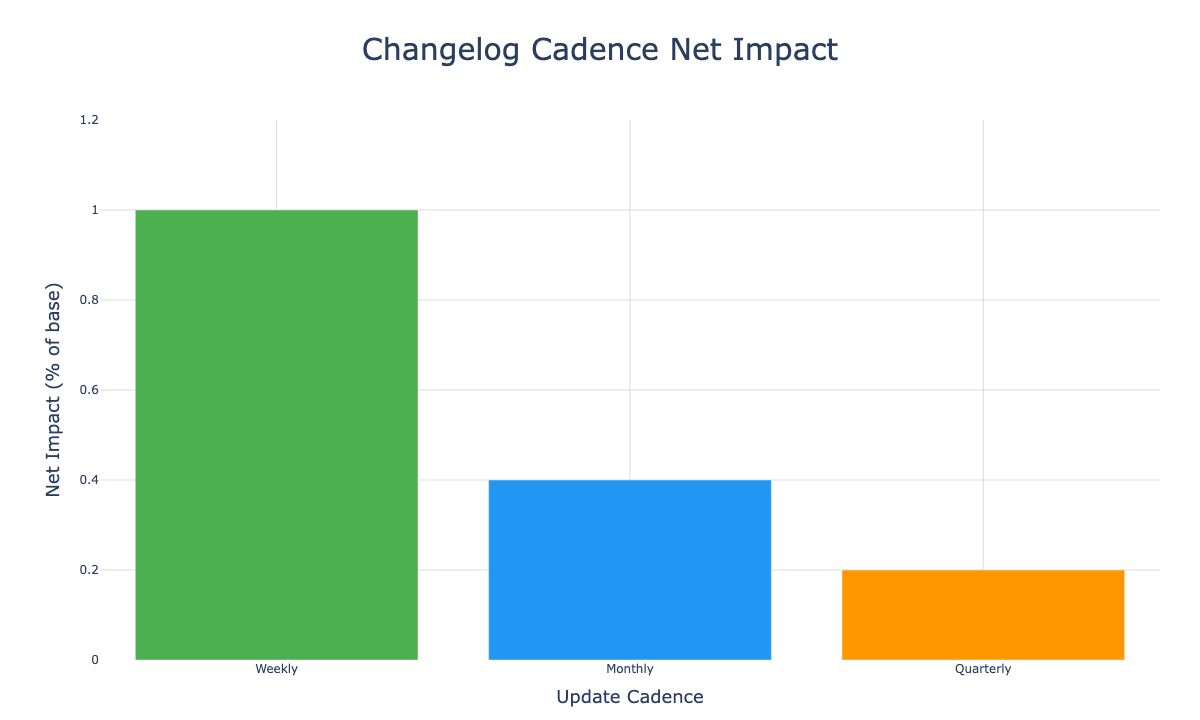
If you need a simple way to think about the impact, the ratio is usually more important than the exact numbers:
| Cadence | % of users who notice | Adoption lift | Net impact |
|---|---|---|---|
| Weekly updates | 10% | 10% | 1% of base |
| Monthly updates | 4% | 10% | 0.4% of base |
| Quarterly updates | 2% | 10% | 0.2% of base |
There are valid exceptions. Some products change slowly, have compliance review cycles, or serve audiences that prefer fewer announcements. In those cases, a monthly or quarterly cadence can still work if it stays consistent.
Weekly cadence creates more visible momentum for customers. It makes progress feel tangible and keeps users aware of the product’s pace.
The STAMP workflow for weekly changelog generation
This workflow is designed to be repeatable and low effort. It focuses on clean inputs and short review loops.
STAMP:
- Source updates in a single format
- Template by change type
- Automate the draft
- Manually verify accuracy
- Publish everywhere
Ownership and inputs determine whether this works. If no one owns the process, it will be skipped. If inputs are inconsistent, drafting becomes slow and error-prone.
A weekly sequence you can run
- Capture each update in a standard format as it ships
- Once a week, select a template per update type
- Generate a draft from the structured inputs
- Verify the details (plans, availability, dates, screenshots)
- Publish a single source and distribute short versions to other channels
Source: standardize the inputs
Short, structured inputs make drafting faster and reduce mistakes. They also make it easier for multiple contributors to submit updates in a consistent way.
Use this input spec:
Feature type: Major Feature | Bug Fix | Integration | API | Performance | Documentation
Feature name: [Name]
Description: [What changed, in plain language]
Impact: [Who it affects and why it matters]
Plans: [Free/Pro/Enterprise/All]
Platform: [Web/iOS/Android/All]
Status: [GA/Beta/Preview]
Key benefits: [List 2-4 benefits]
Date: [YYYY-MM-DD]
For urgent fixes, capture a minimal version and fill in the rest later:
- Feature type
- Feature name
- One-line description
- Plans/platform
- Date
Templates: match the writing to the change type
Different change types need different information to be useful.
A major feature needs context and quick setup steps. A bug fix needs impact and confirmation of what is resolved. An API update needs an example and clear breaking-change notes. A performance update needs a measurable number.
Use this mapping as a starting point:
- Major feature: context + how to use it
- Bug fix: user impact + what is resolved
- Integration: use case + connection steps
- API: example + breaking change clarity (if needed)
- Performance: measurable change (time, speed, reduction)
- Documentation: who it helps + what is easier now
If you want a library of ready-to-copy templates, use this companion post: A practical list of changelog templates you can reuse.
Automation: draft quickly, then review for accuracy
Automation is useful for creating a first draft. It is not a substitute for checking plan names, availability, screenshots, or dates.
For a complete product walkthrough, follow the Userorbit Academy lesson: Write Changelogs From GitHub Commits With AI. It connects a real GitHub repository, scopes the index, configures a suggest-only Release Agent, runs a historical backfill, and reviews the resulting drafts.
Here is a prompt that keeps drafts consistent:
You are a changelog generation assistant. Based on the following update details,
generate a changelog post using the matching template.

INPUT:
Feature type: [Major Feature | Bug Fix | Integration | API | Performance | Documentation]
Feature name: [Name]
Description: [What changed, in plain language]
Impact: [Who is affected and how]
Plans: [Free/Pro/Enterprise/All]
Platform: [Web/iOS/Android/All]
Status: [GA/Beta/Preview]
Key benefits: [List benefits]
Date: [YYYY-MM-DD]

OUTPUT REQUIREMENTS:
- Use the matching template
- Keep tone friendly and direct
- Add placeholders for visuals if relevant: [SCREENSHOT], [GIF]
- Be specific about availability
- Make it scannable with headings and lists
Draft quality improves when inputs are consistent. Accuracy improves when review is consistent.
Plan for a short verification pass before publishing. Incorrect availability can create support tickets and reduce trust.²
For complex technical explanations (API changes, migrations, breaking changes), it is usually better to write the update manually and use automation only for structure.
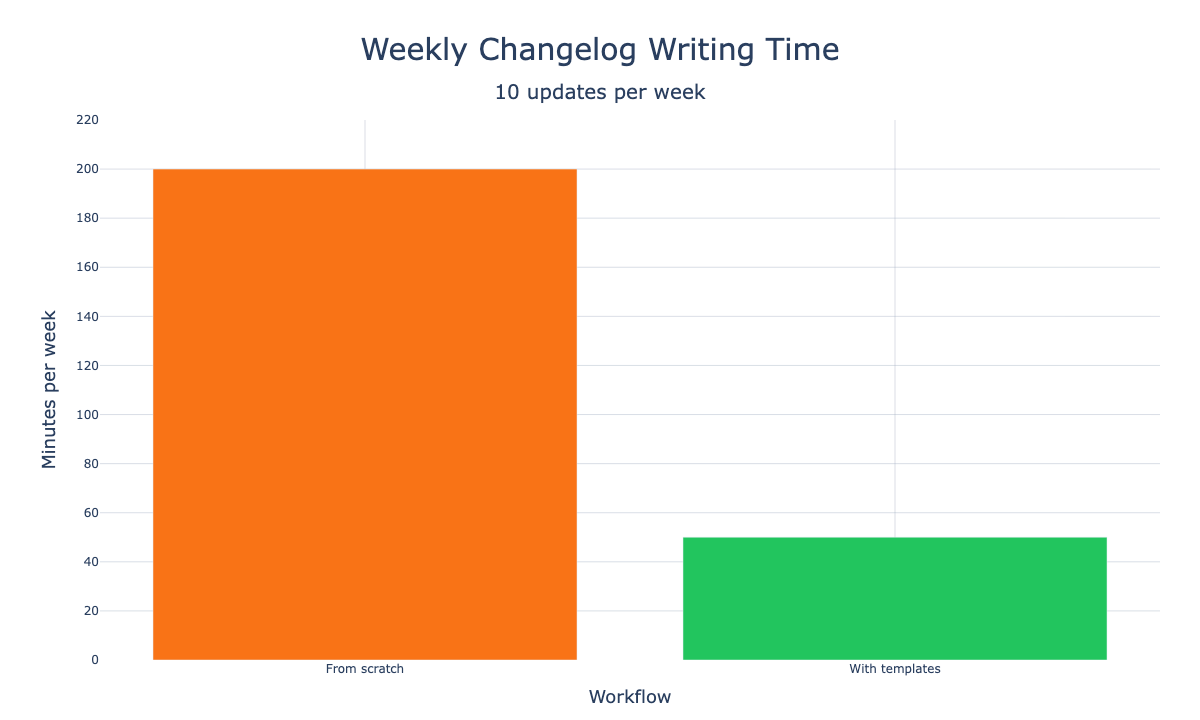
Structured inputs and templates cut the weekly writing burden dramatically, which makes it easier to keep that momentum public.
Publish once, then distribute and measure
Publishing across many channels can become expensive if each channel needs a rewrite. A simple approach is to publish one canonical source, then reuse a short summary everywhere else.
Common channels:
- Blog or changelog page for full context and history
- In-app announcement for awareness at the moment of use
- Email for weekly digests
- Social for lightweight distribution
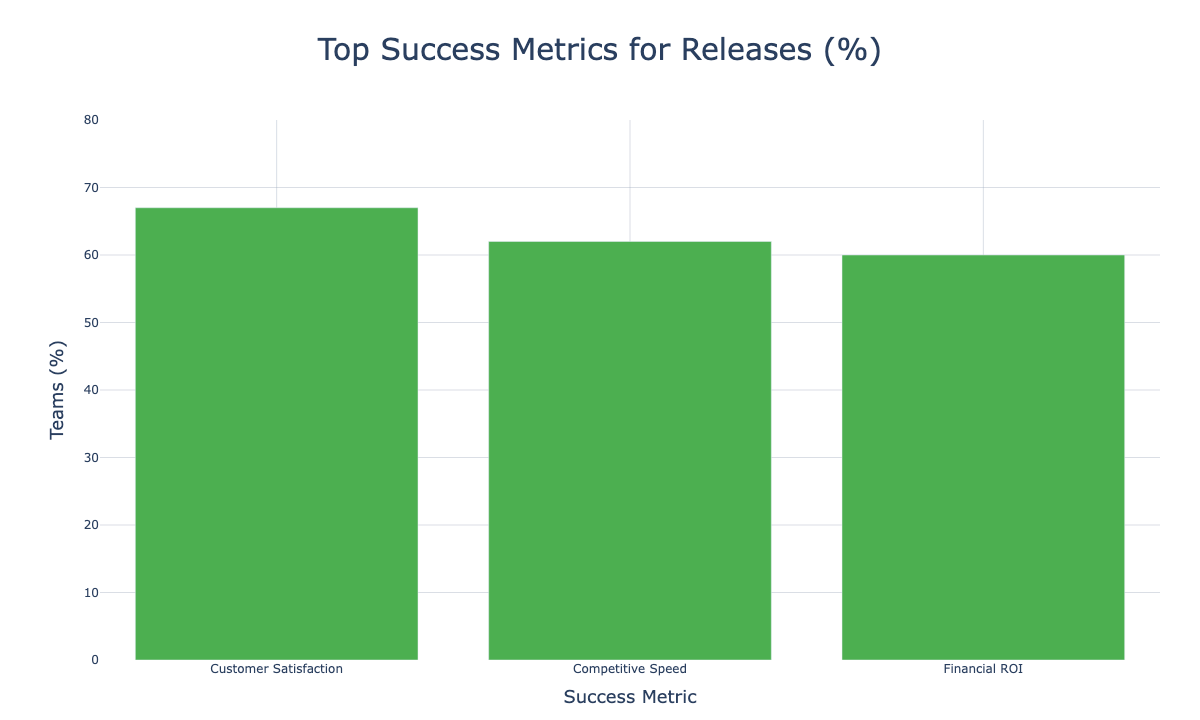
Customer satisfaction, competitive speed, and ROI top the list of release success metrics. That is why distribution has to be part of the workflow, not an afterthought.
How teams automate changelogs today
Several workflows are already common, and they cover different parts of the process.
- Git-based release notes: pull requests and labels generate release notes when a tag or release is created.
- Conventional commit releases: commit messages drive versioning and release notes in CI.
- Monorepo changesets: each PR adds a short changeset entry and automation compiles changelogs and version bumps.
- Changelog tools + integrations: a post in a changelog tool triggers distribution to Slack, email, and social through Zapier or similar tools.
- Tracker-driven notes: Jira or Linear tickets with a “release note” field roll up into an internal release notes page, then a shorter external version is published.
Each option reduces manual work, but teams still run into the same friction points: collecting clean inputs, getting a review step, and distributing updates in-product.
Benchmark data behind automation pressure
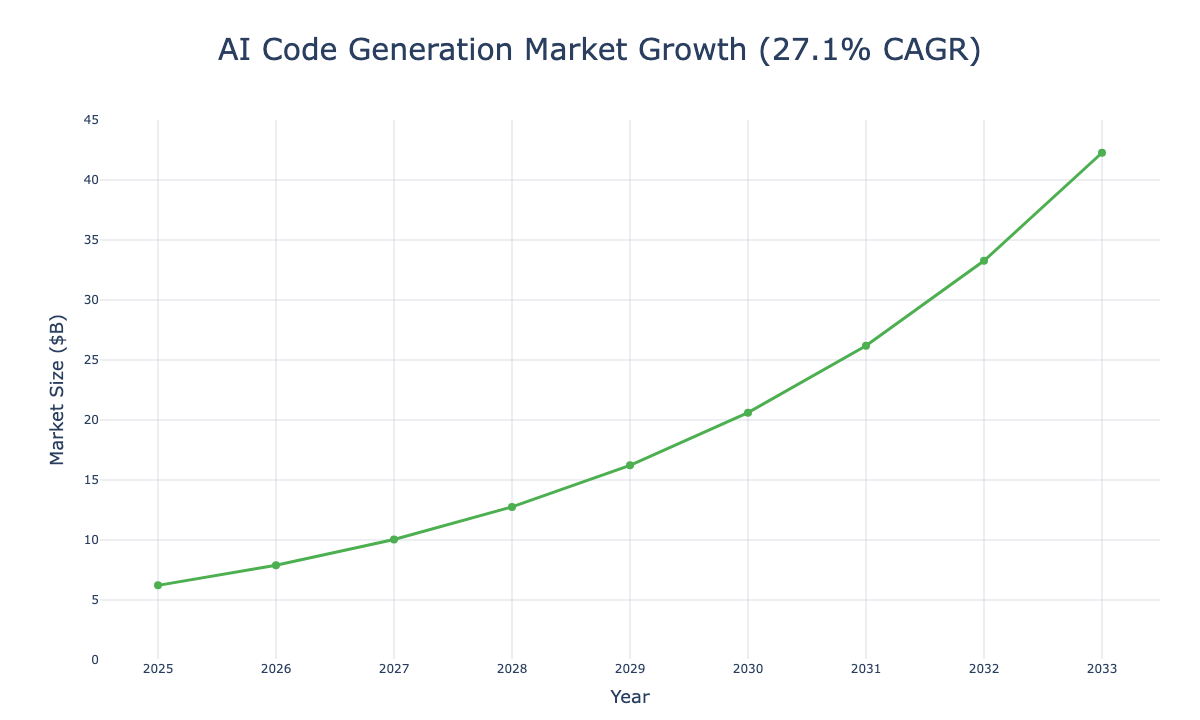
Teams that automate changelogs tend to share the same drivers: rapid shipping, heavier CI/CD, and a growing release surface area. The benchmarks below frame why the weekly workflow matters.
Speed is now a moat. Teams that ship faster can out-learn, out-iterate, and out-communicate slower competitors, and the gap keeps widening as AI accelerates delivery.
The chart below shows how quickly the AI code generation market is growing, which correlates with faster release cycles and higher update volume.
Measure a small set of metrics that connect the changelog to user behavior:
- Views on the changelog post
- Click-through on the in-app announcement
- Adoption within 7 days
- Support tickets that mention the update
If you are in private beta, feedback volume is often more useful than adoption rate.
That is the moment when the right platform makes the workflow feel simple instead of fragile. You need a place to capture updates as they ship, shape them into clear changelog entries, and distribute them without rewriting the same change five times.
Userorbit is built for that exact loop. It turns the STAMP workflow into a single system: draft and approve changelogs, publish updates to a public portal for long-term discovery, and push in-app announcements so users see changes in context. You also get consistent formatting, controlled visibility, and engagement tracking in one place.
If you want the workflow without the glue code, here is what it looks like:
Userorbit
Automate changelogs end to end, then show the momentum to customers
Userorbit includes changelog generation, in-app announcements, and distribution in one workflow. It is designed to help teams start quickly and keep shipping updates visible to users.
- Capture updates as you ship, using a consistent format
- Generate a draft and review accuracy before publishing
- Publish in-product so users see updates in context
- Reuse the same update across email and other channels
The bottom line: keep the process small and repeatable
A weekly changelog becomes manageable when the writing is a short editing step rather than a full reconstruction task.
A simple time estimate shows why the workflow is worth setting up.
If your team ships 10 updates per week and each update takes 20 minutes to write from scratch, that is 200 minutes.
If clean inputs and templates reduce writing to 5 minutes of review and edits per update, that is 50 minutes. The difference is 150 minutes per week, or roughly three work weeks per year.³
Use this checklist for each changelog item:
- Benefit-led headline
- Change type is clear
- Availability is explicit (plan, platform, status)
- One next step exists for the user
The last requirement is ownership. Assign a single owner who is accountable for making sure the changelog ships on schedule. That owner does not have to write every update, but they do need to manage the workflow.