










Most SaaS teams think they have an onboarding problem. They don't. They have a relevance problem.
You've built the welcome emails. You've designed the product tour. You've created a checklist with five carefully chosen steps. And still — 60% of new signups never complete onboarding. They ghost you somewhere between "Welcome!" and the moment your product was supposed to change their workflow forever.
Here's what nobody tells you about onboarding drop-off. It's not that users are lazy or distracted. It's that you're showing every user the same path — and hoping it works for all of them. A marketing manager exploring your analytics tool gets the same walkthrough as a data engineer evaluating your API. A solo founder sees the same checklist as an enterprise team lead onboarding 40 people.
That's not onboarding. That's a broadcast.
AI-powered onboarding flips this entirely. Instead of designing one path and praying, you let the system observe, adapt, and guide each user through the fastest route to their specific "aha" moment. The results aren't incremental — teams implementing AI-driven onboarding are seeing 35-50% improvements in activation rates and cutting time-to-value by more than half.
This guide breaks down exactly how it works, why it matters now, and how your team can implement it without a machine learning PhD.
What AI User Onboarding Actually Means
Let's get specific, because "AI onboarding" has become one of those terms people throw around without defining.
AI user onboarding is the practice of using machine learning models, behavioral analysis, and adaptive logic to personalize and optimize the onboarding experience for each individual user — in real time.
That's different from basic personalization. Showing someone's first name in a welcome email isn't AI onboarding. Neither is branching logic that asks "What's your role?" and shows a different tooltip. Those are static rules written by a human.
True ai-powered onboarding involves three capabilities working together:
- Behavioral observation — tracking what users do (and don't do) from the moment they sign up, building a profile of intent and engagement patterns
- Predictive modeling — using that behavioral data to predict which users are likely to activate, which are at risk of dropping off, and what action would move each one forward
- Adaptive delivery — automatically adjusting the onboarding flow based on predictions, serving different content, nudges, and sequences to different users without manual intervention
Think of it like a skilled customer success manager who watches every new user's screen, notices when they hesitate, and jumps in with exactly the right suggestion at exactly the right time. Except it works at scale — handling thousands of concurrent signups without breaking a sweat.
How It Differs from Traditional Onboarding
Traditional onboarding is prescriptive. You design a flow. Everyone walks it. You measure completion rates and tweak the steps.
AI onboarding is responsive. The system observes behavior, compares it against patterns from thousands of previous users, and dynamically serves the next best action. Two users signing up at the same moment might see completely different sequences — because the system recognized one as a power user who skips tutorials and the other as a cautious evaluator who needs social proof before committing.
The shift isn't cosmetic. It's architectural.
Why Traditional Onboarding Is Breaking Down
Static onboarding worked when SaaS products were simpler and user bases were more homogeneous. Neither of those things is true anymore.
Modern SaaS products serve multiple personas with wildly different jobs-to-be-done. A project management tool might serve freelancers, startup teams, and enterprise PMOs — each needing entirely different feature sets and activation paths. Designing a single onboarding flow that satisfies all three is basically impossible.
The data backs this up. According to industry benchmarks, the average SaaS onboarding completion rate sits between 20-30%. That means 70-80% of people who sign up for your product never finish the setup you designed for them. Not because your product is bad — because your onboarding was built for an average user who doesn't exist.
Three forces are making this worse:
- Product complexity is increasing. Features multiply. Integrations expand. The gap between signup and value widens with every release.
- User patience is decreasing. The average user gives a new tool about 3-5 minutes before deciding whether to invest more time. That window is shrinking every year.
- Competition is intensifying. There are 30,000+ SaaS products on the market. If your onboarding feels generic or slow, users have alternatives one tab away.
Static checklists and linear product tours can't solve this. As we explored in our deep dive on designing frictionless onboarding, even well-designed flows fail when they assume homogeneity. You need a system that learns.
The Five Pillars of AI-Powered Onboarding
Effective automated user onboarding with AI isn't a single feature — it's a system built on five interconnected pillars. Miss one and the whole thing underperforms.
Pillar 1 — Intelligent User Segmentation
Before you can personalize anything, you need to know who you're dealing with. Traditional segmentation uses explicit data — the role dropdown, the company size field, maybe the referral source. AI segmentation goes deeper.
Behavioral clustering groups users based on what they actually do in their first session, not just what they tell you. A user who immediately navigates to integrations signals something fundamentally different from one who starts exploring the dashboard. The AI model identifies patterns across thousands of signups and clusters users into segments that are often more predictive than any form field.
Real example — Canva doesn't ask new users to self-identify as "designer" or "non-designer." Their system watches the first few actions and adapts the template suggestions, tutorial depth, and feature highlights accordingly. The user never fills out a survey. The experience just fits.
Pillar 2 — Predictive Activation Scoring
Not all users are equal, and not all deserve the same resources. Activation scoring uses machine learning to assign each new signup a probability of reaching your activation milestone — whether that's completing a key workflow, inviting a teammate, or hitting a usage threshold.
This matters because it lets you allocate effort intelligently:
- High-probability users get a streamlined, low-friction path. Don't over-guide them — they'll activate on their own.
- Medium-probability users get targeted nudges at predicted friction points. A well-timed tooltip or contextual help article can tip them over.
- Low-probability users might trigger a human touch — a CSM outreach, a personalized email, or even a guided demo offer.
The scoring model improves over time as it ingests more behavioral data. What starts as a rough heuristic becomes a precision instrument within weeks.
Pillar 3 — Dynamic Flow Orchestration
This is where the magic happens. Instead of a fixed checklist, the onboarding flow reorganizes itself based on user behavior and predicted needs.
Say your product has five key activation steps. A traditional flow presents them in order — step 1 through 5. An AI-orchestrated flow might skip step 2 for a user who already completed that action via API, surface step 4 first for a user whose behavioral pattern suggests that feature is their primary use case, and add an extra contextual step for a user who's showing signs of confusion.
The orchestration engine makes these decisions in real time, drawing on:
- The user's current behavior
- Their predicted segment
- Success patterns from similar users
- Time-based signals (session duration, return frequency)
Pillar 4 — Contextual Content Generation
AI doesn't just decide what to show — it can generate how to show it. Contextual content generation means the tooltips, help text, and guidance copy adapt to the user's context.
A technical user exploring your API documentation might see concise, jargon-rich guidance. A non-technical user doing the same action might see a plain-language explanation with a video link. Same feature, same moment — different delivery.
Some teams are already using LLMs to generate onboarding microcopy dynamically. Instead of writing 47 tooltip variations for different personas, you write one prompt template and let the model adapt the tone, complexity, and examples to each user.
Pillar 5 — Continuous Learning Loop
The fifth pillar is what makes the whole system compound over time. Every user interaction feeds back into the model. Every completed onboarding refines the predictions. Every drop-off teaches the system what not to do.
This feedback loop means your onboarding gets better every day without manual intervention. You're not A/B testing two flows and picking a winner — you're running thousands of micro-experiments simultaneously and converging on optimal paths for each segment.
Real-World Results — What the Data Shows
Let's talk numbers, because strategy without evidence is just opinion.
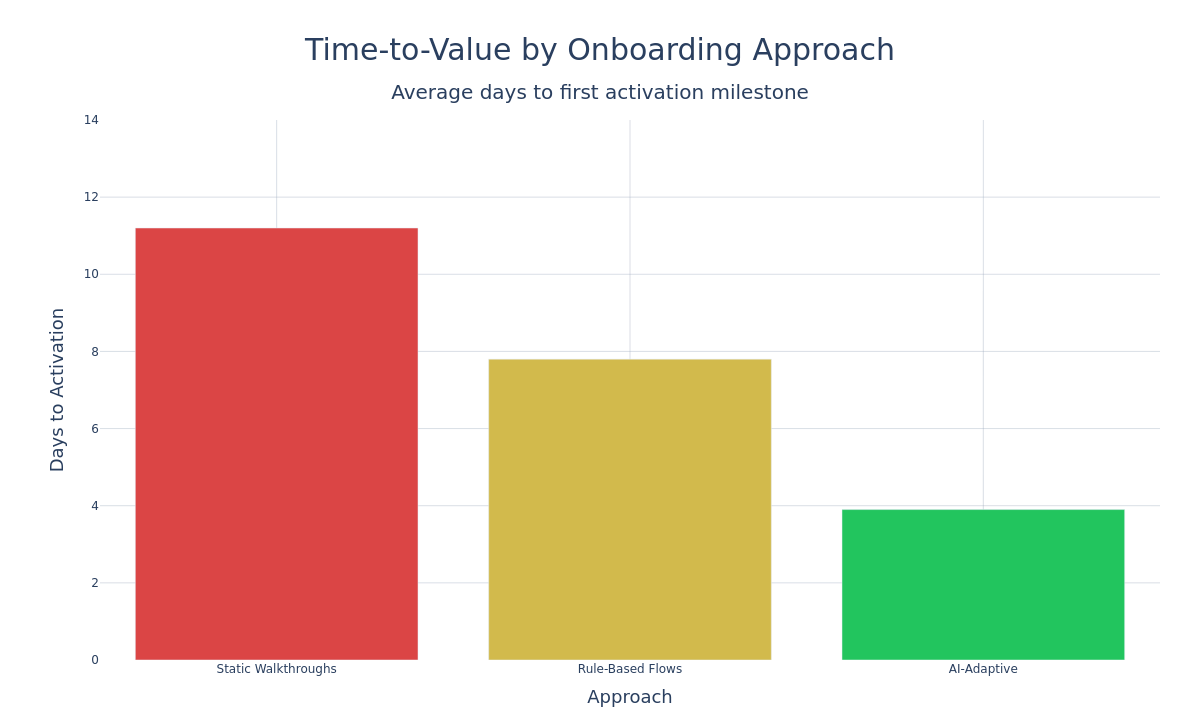
The impact of ai onboarding saas implementations shows up across every key metric:
Activation rates climb dramatically. Companies that move from static to AI-adaptive onboarding typically see activation rates jump 35-50%. Duolingo's adaptive learning path — which adjusts difficulty, content, and pacing based on user behavior — helped them achieve one of the highest activation rates in consumer SaaS. The same principle applies to B2B products.
Time-to-value compresses. When users see relevant content immediately instead of wading through generic steps, they reach their "aha" moment faster. Teams report reducing median time-to-activation from 8-12 days to 3-5 days — a compression that directly impacts trial-to-paid conversion.
Support tickets decrease. Smart onboarding preempts confusion. When the system detects hesitation and proactively offers help, users don't need to submit tickets. Teams implementing contextual AI guidance report 25-40% reductions in onboarding-related support volume.
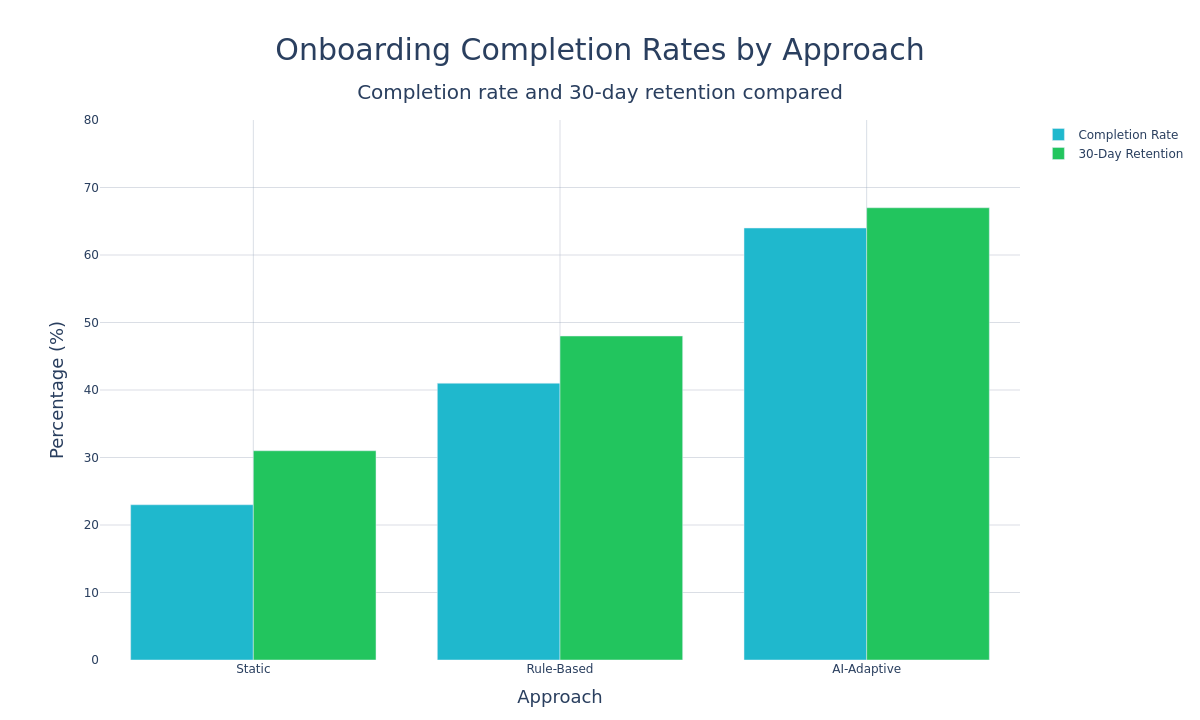
Retention improves downstream. This is the sleeper benefit. Users who have a personalized onboarding experience don't just activate at higher rates — they stick around longer. The correlation between onboarding quality and 90-day retention is well documented in research like the 2025 onboarding report, and AI-powered experiences amplify that effect.
How to Implement AI Onboarding — A Practical Playbook
Enough theory. Here's how to actually build this into your product, broken into phases that any SaaS team can follow.
Phase 1 — Instrument and Baseline (Weeks 1-2)
You can't optimize what you don't measure. Before adding any AI, you need clean behavioral data.
- Define your activation milestone. What's the single action (or set of actions) that separates users who retain from those who churn? Be specific — "created first project and invited one teammate" is better than "used the product."
- Instrument your onboarding funnel. Track every meaningful interaction from signup to activation. Page views, clicks, feature usage, time-on-step, error encounters, help doc visits — all of it.
- Establish baselines. Measure your current completion rate, time-to-activation, and activation-to-retention correlation. You need these to prove AI is working later.
Phase 2 — Segment and Score (Weeks 3-4)
With data flowing, build your first segmentation and scoring models.
- Start with heuristic segments. Before ML, use rule-based segments derived from your data. "Users who visit integrations page in first session" vs. "users who start with templates" — these behavioral buckets often reveal natural persona boundaries.
- Build a simple activation predictor. Even a logistic regression model trained on your historical data can identify which early-session behaviors correlate with activation. You don't need deep learning — you need signal.
- Validate against reality. Run the model against a holdout set of recent signups. If it predicts activation with >70% accuracy, you have something useful.
Phase 3 — Adapt and Test (Weeks 5-8)
Now you start making the experience respond to the data.
- Create 2-3 variant flows for your primary segments. Not 47 variants — start simple. A power-user path that skips basics. A cautious-evaluator path with more hand-holding. A team-lead path focused on collaboration features.
- Wire up the orchestration logic. When a user's behavior matches segment X, serve flow X. This can start as simple if/else rules — you'll graduate to ML-driven orchestration later.
- Add contextual nudges at predicted friction points. If your model shows that 60% of users who reach step 3 but don't complete it within 48 hours never activate, trigger a targeted in-app message or email at that exact moment.
- Measure everything. Compare activation rates, time-to-value, and retention across your adaptive flows vs. the old static experience.
Phase 3 — Scale and Automate (Weeks 9+)
Once your adaptive flows prove their value, it's time to let the machine take over more decisions.
- Replace rule-based segments with ML-driven clustering that discovers segments you didn't anticipate
- Implement multi-armed bandit testing instead of traditional A/B tests — the system automatically allocates more traffic to winning variants
- Add real-time flow adjustment where the system modifies the sequence mid-onboarding based on in-session behavior
- Build automated re-engagement for users who drop off, with timing and content personalized to their specific drop-off point
This phase is where the compounding effect kicks in. Every week, the model gets smarter. Every month, your activation rates tick up. The work you did in phases 1-3 pays dividends indefinitely.
Common Mistakes That Kill AI Onboarding Projects
Having watched dozens of teams attempt this, here are the failure modes that show up most often.
Over-engineering from day one. Teams try to build a full ML pipeline before they've even defined their activation metric. Start with heuristics. Graduate to models. The order matters.
Ignoring the cold-start problem. AI needs data. New products with fewer than 1,000 signups don't have enough behavioral signal to train meaningful models. Use rule-based personalization until you have volume, then layer in ML.
Personalizing the wrong things. Changing button colors based on user segment isn't AI onboarding — it's A/B testing with extra steps. Focus personalization on what content users see, in what order, and at what pace. Those are the levers that move activation.
Forgetting the human fallback. AI should handle the 80% of users whose behavior follows recognizable patterns. For the 20% who don't — edge cases, confused users, high-value enterprise prospects — you need a human handoff mechanism. The best AI onboarding systems include escalation triggers that route users to human support or CSM outreach when the model's confidence drops below a threshold.
Measuring the wrong outcomes. Completion rate is a vanity metric if completers don't retain. Always tie your onboarding metrics to downstream business outcomes — trial-to-paid conversion, 30-day retention, expansion revenue. An onboarding flow that's "completed" but doesn't drive retention is just busywork for your users.
As we've documented in our analysis of how checklists and personalized guides accelerate adoption, the structure of your onboarding matters enormously — but only when it's connected to the right outcomes.
The AI Onboarding Tech Stack
You don't need to build everything from scratch. Here's a practical stack that most SaaS teams can assemble without hiring a dedicated ML team.
Data layer:
- Event tracking — Segment, Rudderstack, or PostHog for behavioral data collection
- Data warehouse — BigQuery, Snowflake, or even PostgreSQL for smaller volumes
- Identity resolution — connecting anonymous pre-signup behavior with authenticated post-signup activity
Intelligence layer:
- Segmentation models — Python + scikit-learn for clustering, or managed ML services like SageMaker
- Activation scoring — logistic regression or gradient boosting models, updated weekly
- LLM integration — OpenAI or Anthropic APIs for contextual content generation
Delivery layer:
- In-app guidance — tools that support conditional logic and user properties for dynamic flow delivery
- Email orchestration — Customer.io, Braze, or Iterable for behavioral email sequences
- Analytics — Mixpanel or Amplitude for funnel analysis and cohort tracking
The key architectural decision is how tightly coupled your intelligence layer is with your delivery layer. Loosely coupled (models recommend, humans configure flows) is safer to start. Tightly coupled (models directly control what users see) is more powerful but requires more monitoring and guardrails.
The Bottom Line
AI user onboarding isn't a future trend — it's a present-tense competitive advantage. The SaaS teams winning the activation game in 2026 aren't the ones with prettier product tours or cleverer welcome emails. They're the ones whose onboarding systems learn from every user and adapt in real time.
The playbook is straightforward. Instrument your funnel. Define activation. Build behavioral segments. Score users. Adapt your flows. Let the model learn. Repeat.
You don't need a massive ML team to start. You need clean data, a clear activation metric, and the willingness to let go of the one-size-fits-all onboarding flow you've been running for years.
The gap between static and adaptive onboarding is only widening. Every month you wait is another month of users churning through a generic experience that wasn't built for them.
Start with the data you have. Build the simplest version that could work. Let it learn.
Your future activation rates will thank you.
See AI-Powered Onboarding in Action
UserOrbit helps SaaS teams build personalized onboarding flows that adapt to every user. Start your free trial and watch activation rates climb.